Spam traffic in GA4 comes in several flavours: bots crawling your pages, referral spam that puts strange domains into your acquisition reports, and ghost spam, where data lands in your property although nobody ever visited your site. On 21 September 2026 Google shipped the tool many analysts had been asking for: a hostname filter that lets through only data from domains you approve.
This article explains what the new GA4 hostname include filter does, how to roll it out without losing good data, the gap it deliberately leaves open, and how Matomo handles the same problem.
What changed: an allowlist instead of a blocklist
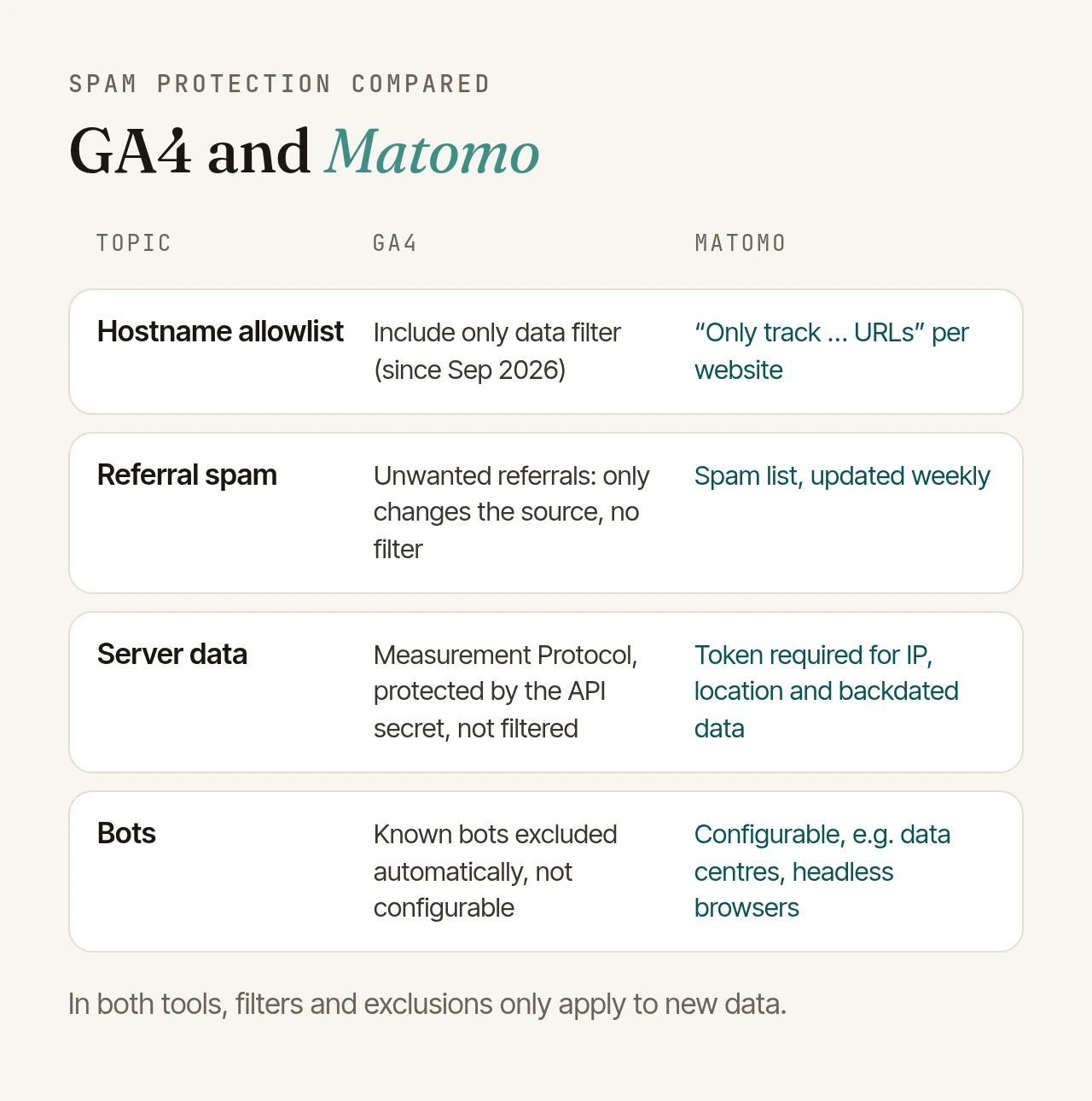
GA4 has had data filters for a while: for internal and developer traffic since 2020, and for hostnames since June 2026, but only as exclude filters. Getting rid of spam meant adding every new spam domain by hand, which Google itself describes as requiring "ongoing manual updates".
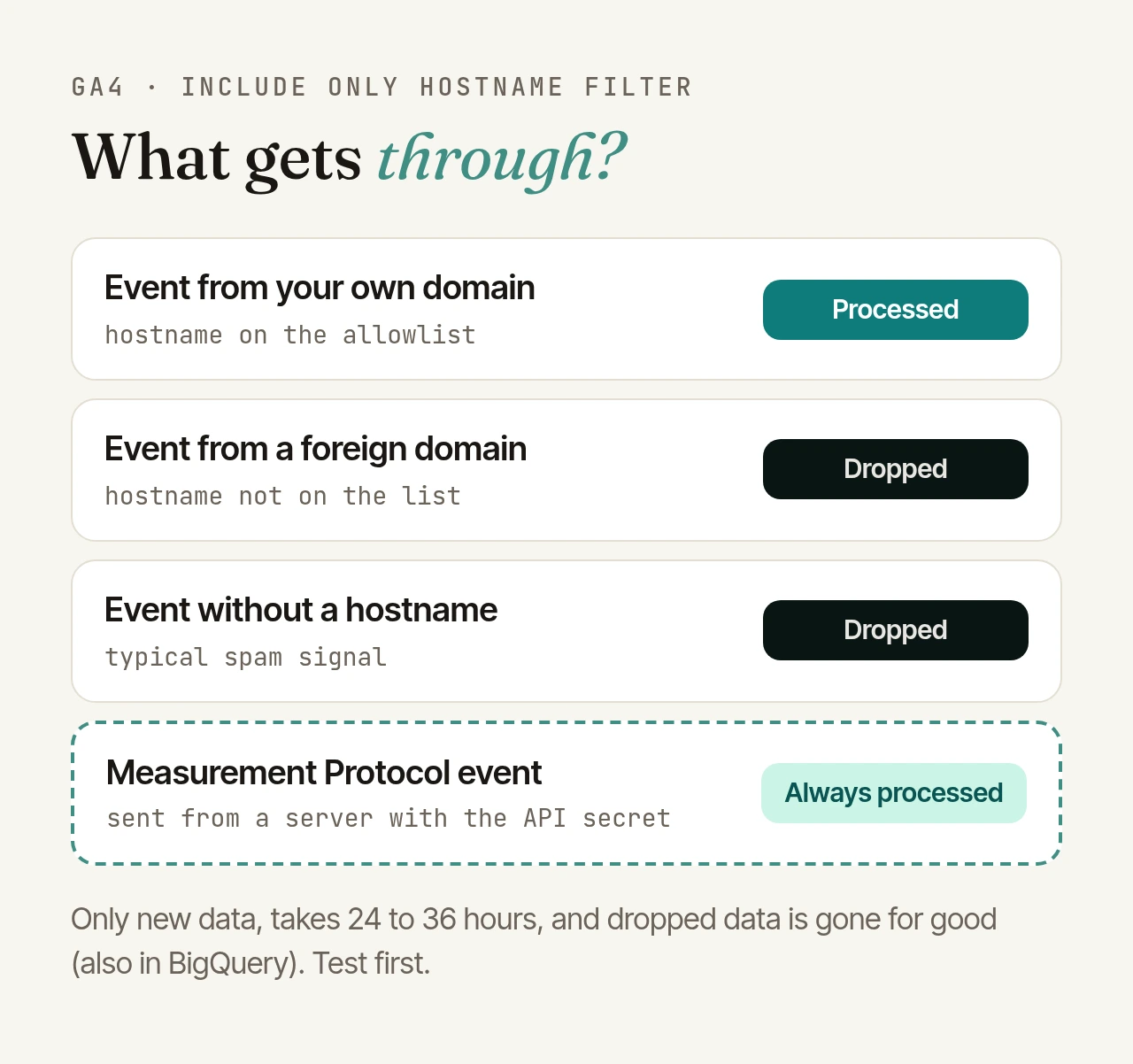
Since 21 September the hostname filter also comes as Include only. You list the domains that are allowed to send data, and everything else is dropped. According to Google:
- Empty hostnames are blocked. An include filter automatically drops events without a hostname, because a missing hostname "typically indicates spam or abnormal traffic".
- The Measurement Protocol is exempt. Events sent through the Measurement Protocol are explicitly not filtered. More on that below.
Worth knowing: the "List unwanted referrals" setting is not a filter. It only marks events so that a referring site, such as a payment provider, is not credited as the traffic source. The data itself still lands in your property.
How to roll it out without losing data
You create the filter under Admin › Data collection and modification › Data filters, filter type "Web hostname traffic filter". You need at least the Editor role. Four properties matter before you switch it on:
- It is permanent. Data dropped by an active filter is never processed and never shows up in Google Analytics or in the BigQuery export. You cannot get it back.
- There is a testing state. In "Testing", GA4 only tags matching data with the dimension "Test data filter name". Google recommends waiting 24 to 36 hours before you validate, and activation also takes up to 36 hours to kick in.
- It only works going forward. Data you already collected stays as it is, spam included.
- The conditions are simple. A hostname can exactly match, begin with, end with or contain your value; Google does not list regular expressions. A property can have at most ten data filters, and all active include filters are combined and applied before any exclude filters.
The classic mistake is an incomplete list. Before activating, make sure every legitimate hostname is on it: subdomains like shop. or app., country domains, checkout or booking flows on separate domains, and anything else that runs the same measurement code. The testing state shows you what the filter would drop, so review that before you go live.
The gap: the Measurement Protocol
The Measurement Protocol lets servers send events straight to GA4, for example purchases completed in a back end. Google deliberately lets these events through the new filter so that legitimate server-side data is not lost.
That path is protected by an API secret that every request has to carry. Google warns explicitly against exposing it in your website's code: anyone who knows it "can send arbitrary or spam data" to your property and corrupt your reports. In practice:
- Keep the API secret on the server, never in the browser.
- Rotate it regularly, as Google recommends.
- If suspicious traffic shows up despite a hostname filter, a leaked secret is the first thing to check.
How Matomo handles spam traffic
Matomo has no single hostname filter, but several settings that together do the same job. Like GA4 filters, they only apply to new data.
Only track your own URLs. In each website's settings (Administration › Websites › Manage), below the list of URLs, there is the option "Only track visits and actions when the action URL starts with one of the above URLs." With it switched on, Matomo drops every request whose domain and path don't match one of the listed URLs, so each valid subdomain needs its own entry. This is the counterpart to the GA4 allowlist.
Referrer spam filtered automatically. Matomo ships a public list of known spam domains and updates it every week; referrals from those domains never reach your reports. The list is maintained on GitHub and had more than 2,300 entries in early October 2026. Your own domains that should not count as a source go into "Excluded referrers".
Exclusions by IP, user agent and parameter. IPs can be excluded as ranges, user agents also by regular expression since Matomo 4.1.1. On a self-hosted instance, the exclude_requests setting can even drop requests based on any tracking parameter.
Protected parameters. Plain tracking requests need no key, only the site ID. But a request that sets the visitor's IP, location or a timestamp older than 24 hours has to authenticate with a token, so fake visits with invented origins or backdated data can't simply be injected.
Block bots and data centres. Matomo's free Tracking Spam Prevention plugin can block traffic from cloud hosting providers, headless browsers and server-side tracking libraries, cap the number of actions per visit and work with country and IP lists.
Who controls what gets in?
Two days after Google's announcement, Matomo published a data governance checklist. Its questions go beyond spam and fit the topic well: where exactly do the data, backups and logs live? Who can change settings, export data or connect integrations? Which events and fields are collected, masked or excluded, and which bot, spam and internal traffic filters apply? And can you trace later who changed which filter and when?
The last point deserves attention, because a wrong filter in GA4 drops data for good. Whatever tool you use, log every filter change with a date and a reason.
Checklist
- Collect every legitimate hostname: subdomains, country domains, checkout and booking domains.
- Test first in GA4, wait 24 to 36 hours, review what would be dropped, then activate.
- Protect the Measurement Protocol secret: server-side only, rotated regularly.
- In Matomo, switch on "only track your own URLs" and list every subdomain.
- Maintain excluded referrers, IPs and user agents, and keep the spam list updating.
- Document filter changes, because none of the filters work retroactively and GA4 filters are permanent.
How do you make sure only real traffic lands in your reports today: filters, server-side validation, or not at all yet? If you'd like to go through your Matomo setup with us, get in touch.