Cookie banners annoy visitors and cost you data: whoever declines is missing from your statistics. No wonder so many site owners ask whether Matomo can run without cookies. Technically, the answer is yes: Matomo offers several settings for it. Legally, though, it depends on where your visitors are, and in strict countries such as Germany "cookieless" alone is not enough.
This article covers what each setting does, what you lose in accuracy without cookies, how an opt-out works technically and where the limits are. It is a technical overview, not legal advice.
Three settings and what they do
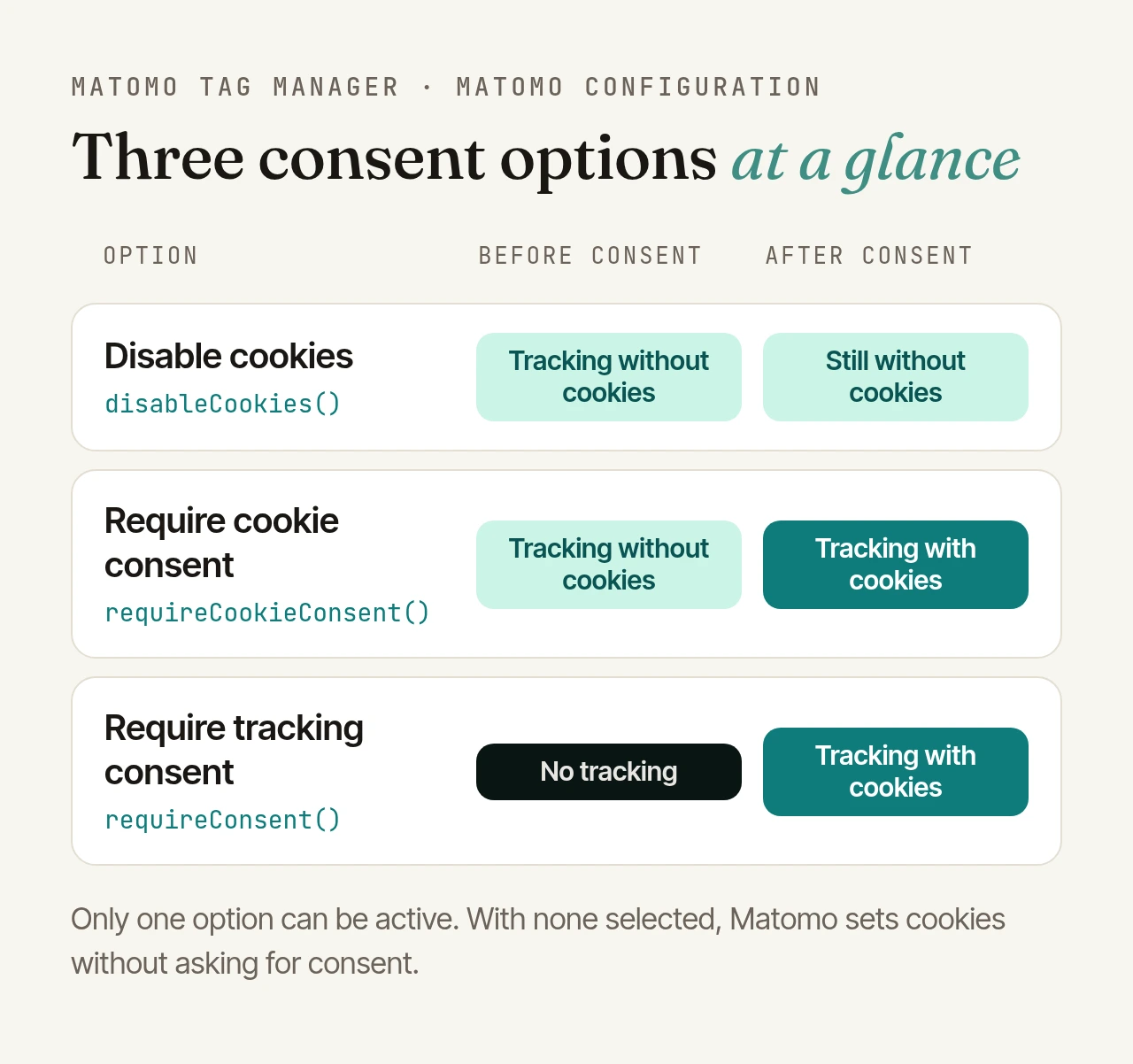
In Matomo Tag Manager, the Matomo configuration variable offers three consent options, and only one can be active at a time. In the JavaScript tracker they correspond to three functions:
- Disable cookies (
disableCookies()): Matomo sets no tracking cookies and deletes existing ones, even if a visitor has agreed to cookies. Tracking continues, just without cookies. - Require cookie consent (
requireCookieConsent()): Matomo tracks without cookies at first and only sets them once your site reports consent: for the current page view withsetCookieConsentGiven(), permanently withrememberCookieConsentGiven(). - Require tracking consent (
requireConsent()): Matomo sends nothing at all until consent is given.
With none of the three selected, Matomo sets cookies without asking for consent. If you want to be sure an instance never creates cookies, you can also enforce it on the server: the privacy settings include an option to force tracking without cookies.
What becomes less accurate without cookies
Without a cookie, Matomo groups page views into visits using a config_id. It is a hash of operating system, browser, browser plugins, IP address and browser language, mixed with a random daily value, different for every website and renewed after 24 hours at the latest. By default, Matomo only matches requests to the same visit within 30 minutes.
Most reports keep working unchanged: page views, entry pages, traffic sources of the visit, goals within a visit. What becomes inaccurate or empty is everything that follows a person across several visits:
- unique, new and returning visitors,
- attributing a conversion to an earlier channel (it only counts for the visit in which it happens),
- multi-attribution and cohorts,
- days since last visit, visits to conversion and similar metrics.
In short: you count visits, not people. For many websites that is perfectly fine. For shops with long purchase decisions, less so.
The limit: cookieless doesn't mean consent-free
Article 5(3) of the EU ePrivacy Directive, implemented in Germany as section 25 of the TDDDG (called TTDSG until May 2024), requires consent for storing information on a device or reading it from there, unless that is strictly necessary for the service the user explicitly requested. Cookies are just one case.
How strictly this is applied differs by country. France, for example, has an exemption for analytics under conditions, usually combined with an opt-out. Germany is at the strict end:
- The guidance of the German Data Protection Conference (2024) applies the rule whether or not personal data is involved, and deliberately contains no general exemption for audience measurement.
- The German federal data protection commissioner (BfDI) considers Matomo on federal websites to require consent as a rule and rates masked IP addresses as pseudonymised only.
- The authorities treat JavaScript that actively reads device properties, such as screen resolution, as access to the device.
Matomo itself classifies Germany as a strict country. According to Matomo, only server-side methods such as analysing web server logs are clearly outside the TDDDG. For JavaScript tracking, Matomo recommends assuming consent is required until a supervisory authority clarifies otherwise. A very narrow configuration without consent is something Matomo only considers possible after consulting your privacy counsel: anonymised, no cookies, passive JavaScript only, and browser feature detection fully disabled.

Browser feature detection is the point most often overlooked. By default, the tracker reads the screen resolution and browser plugins. disableBrowserFeatureDetection() (a separate checkbox in Tag Manager) stops that. Matomo introduced it explicitly with section 25 in mind. Two details: "require cookie consent" on its own leaves detection switched on, and as soon as your site reports consent, Matomo switches it back on.
IP masking and retention periods
Whichever way you choose, two settings belong in every privacy-conscious instance:
- Mask IP addresses: by default Matomo masks 2 bytes (198.51.100.123 becomes 198.51.0.0); you can choose 1, 2 or 3 bytes or remove the address completely. Separately, you decide whether geolocation and the
config_iduse only the masked address. Remember your web server logs: they still contain the full addresses. - Delete raw data: under "Regularly delete old raw data" you set a period in days. Matomo recommends keeping detailed logs for only three to six months; aggregated reports are kept.
Opt-out: the objection switch
Where you measure without consent, visitors need a simple way to object. Matomo ships ready-made opt-out forms (in the privacy settings), and the JavaScript API lets you build your own switch:
const trackers = window.Matomo?.getAsyncTrackers?.() ?? [];
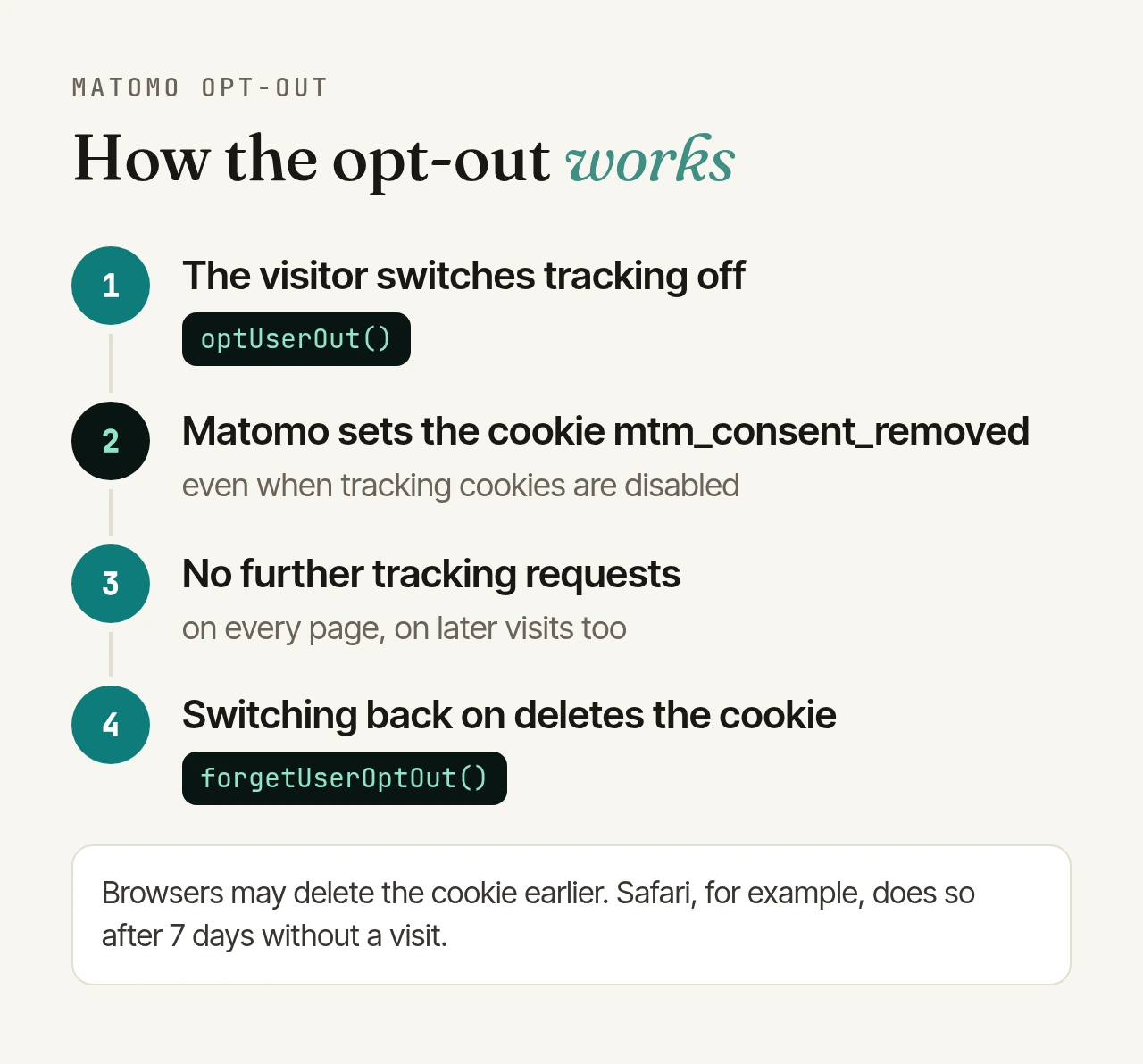
trackers.forEach((tracker) => tracker.optUserOut());       // opt out
trackers.forEach((tracker) => tracker.forgetUserOptOut()); // opt back in
The objection is stored in the cookie mtm_consent_removed. It carries no identifier, is the same for all visitors, and Matomo classifies it as strictly necessary. Important for cookieless setups: Matomo sets this cookie even when tracking cookies are disabled. We verified that in a browser. After that, no more tracking requests are sent, including on later visits.
One limitation remains: browsers delete cookies by their own rules. Safari, for example, deletes them after seven days without a visit. Then the objection is gone, too. And Matomo points out that an opt-out is only sufficient where consent is not required.
Tag Manager and Content Security Policy
If your website uses a strict Content Security Policy, it blocks the usual Tag Manager snippet because it is embedded as an inline script. The fix: move the snippet into its own script file and allow your Matomo instance in three directives:
script-src  'self' https://analytics.example.org
connect-src 'self' https://analytics.example.org
img-src     'self' data: https://analytics.example.org
script-src allows the container and tracker, connect-src the tracking requests via beacon or XHR, and img-src the tracking-pixel fallback.
Checklist
- Clarify the legal situation: in Germany, measure with consent when in doubt; run a setup without consent only after consulting your privacy counsel.
- Choose a Tag Manager option deliberately and don't leave it on "none".
- Disable browser feature detection if you measure without consent.
- Mask IP addresses and use the masked address for enrichment too; don't forget web server logs.
- Turn on raw data deletion; three to six months is a good benchmark.
- Offer an opt-out and test it with tracking cookies disabled.
- Update your privacy policy: purpose, legal basis, data collected, retention, how to object.
- Check in a browser: no
_pk_*cookies, and no tracking requests after opting out.
This article is not legal advice. For an assessment of your specific setup, talk to your privacy counsel.
If you'd rather not run Matomo yourself: we operate your instance in German data centres, including updates, backups and monitoring.