On September 9, 2026, Google brought back one of the most-missed Universal Analytics features: dashboards in Google Analytics 4. If you used to build every management overview in Looker Studio, you can now put your key metrics on a single page right inside GA4.
That makes it a good moment for a sober look at the GA4 vs. Matomo question: which criticisms of GA4 has the update resolved, and which ones are structural and stay? This article sorts both out, with sources and without making GA4 look worse than it is.
What GA4 dashboards can do
Google describes dashboards as a flexible way to view a business's KPIs on a single report. In practice:
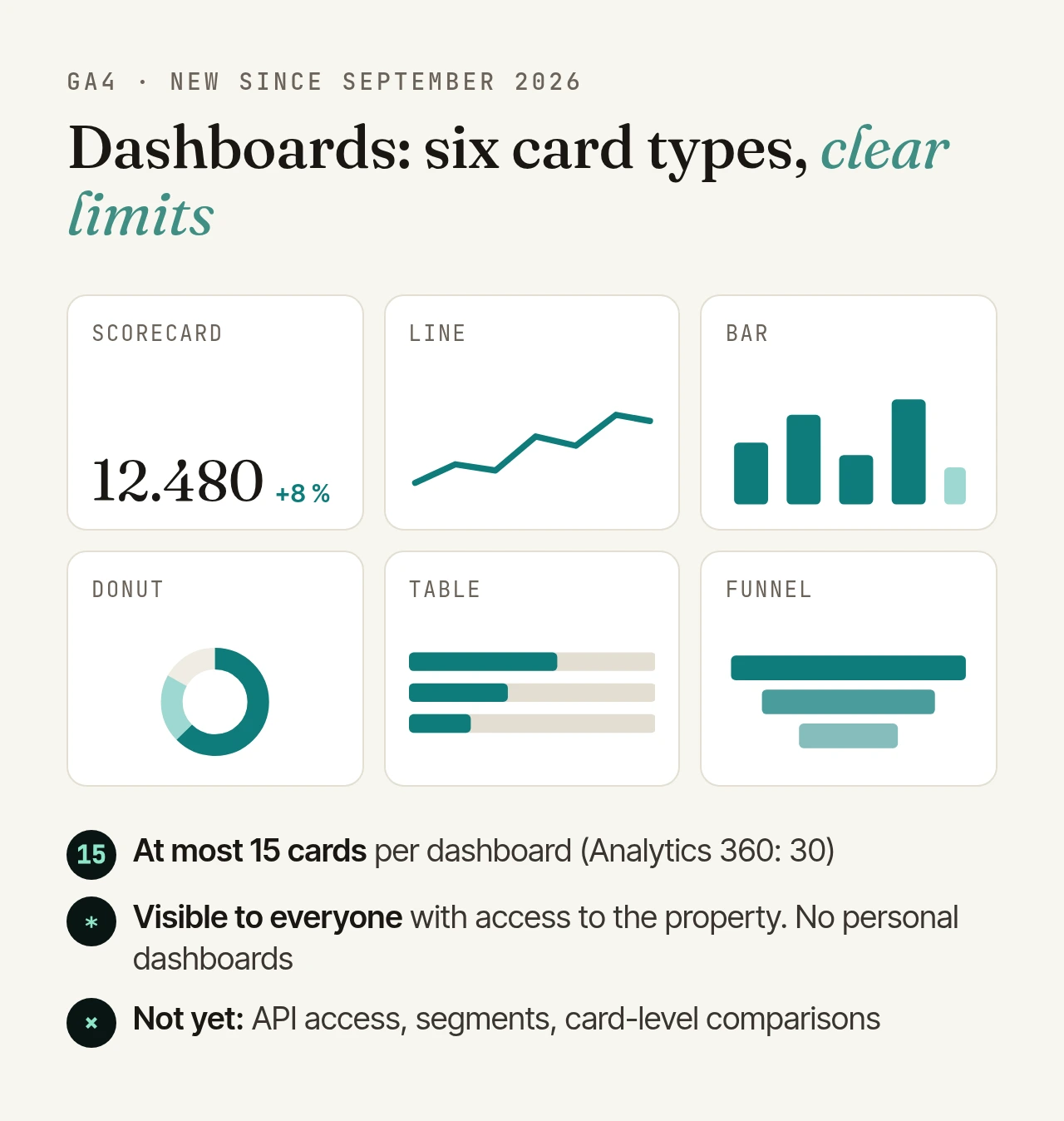
- Cards on a grid, arranged by drag and drop: scorecards (showing the change once you pick a comparison period), tables, line, bar and donut charts, and funnels.
- Publish and pin: finished dashboards can be added to the left-hand navigation. Creating and publishing requires the Editor or Administrator role.
- Limits: up to 15 cards per dashboard on standard properties, 30 on Analytics 360. Every published dashboard is visible to everyone with access to the property. There are no personal dashboards. API access, segments and card-level comparisons are not supported yet.
Google does not document whether data thresholds or sampling apply to dashboard cards.
For day-to-day work this is a real improvement. If missing overviews were your main complaint about GA4, you have one reason less.
What stays: data ownership and legal basis
Dashboards do not change where your data is processed. GA4 is a Google service; the measurement data sits with Google, including in the US.
Transfers to the US. Since July 10, 2023, the EU-US Data Privacy Framework has provided an adequacy decision by the European Commission. The EU General Court dismissed an action against it on September 3, 2025 (Case T-553/23, Latombe). According to reports, an appeal against that judgment is pending before the Court of Justice. As of today the framework is in force, but it is already the third attempt after Safe Harbor and Privacy Shield, and the Commission has to keep monitoring US law.
Consent. Transfers are one question; the other is whether you need consent to measure at all. In 2020, the German data protection authorities (DSK) held that Google Analytics can "as a rule" only be used lawfully with valid consent. That resolution predates GA4 and the new framework, and there is no newer GA4-specific statement. In practice, GA4 in Germany almost always runs behind a consent banner.
What happens without consent is governed by Google's consent mode:
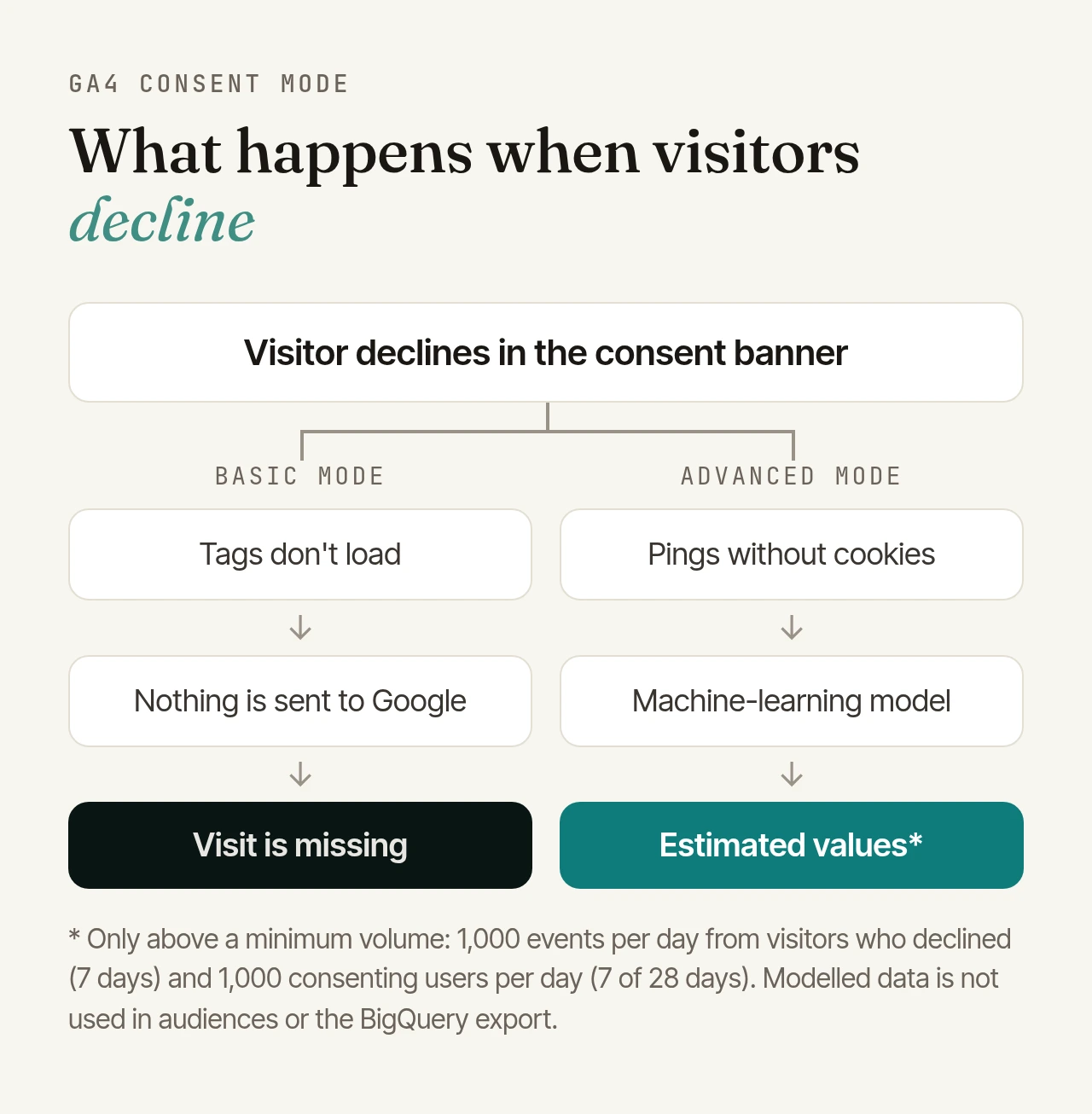
- In basic mode, tags load only after consent. If a visitor declines, nothing is sent to Google. Those visits are missing.
- In advanced mode, GA4 sends cookieless pings when consent is denied, and a machine-learning model estimates the behaviour of those who declined. This only works above a minimum volume: at least 1,000 events per day with consent denied for seven days, and at least 1,000 consenting users per day on seven of the last 28 days. Modelled data is not used in audiences or in the BigQuery export.
For small and mid-sized sites, that often means visitors who decline simply don't show up.
This section is an overview, not legal advice.
Retention, thresholds, sampling
This deserves a closer look. Many comparisons, including Matomo's own blog, describe GA4 as stricter than Google's documentation does.
- Data retention: standard properties keep event data for 2 or 14 months; 26, 38 or 50 months are available on Analytics 360 only. Large properties are limited to 2 months. Importantly, retention only affects explorations and funnel reports, not the aggregated standard reports. Age, gender and interest data is always kept for 2 months.
- Data thresholds: when a report includes demographics or search queries with too few users, GA4 withholds rows. Google sets the thresholds; you cannot change them.
- Sampling: standard reports are not affected by the sampling limit. Ad-hoc queries such as explorations are sampled once they process more than 10 million events (up to 1 billion on Analytics 360). Google names one exception itself: filtering very large datasets by country can lead to sampled values in standard reports, too.
- Raw data: standard properties can export to BigQuery. The daily export is capped at 1 million events per day. Streaming export has no limit but costs $0.05 per gigabyte, plus BigQuery storage and query costs.
For a fair comparison: self-hosted Matomo does not sample and can keep raw data and reports indefinitely. You set the deletion periods yourself. In return, Matomo groups long tables beyond a row limit under "Others" when archiving (for example beyond 500 pages); on your own servers, that limit is configurable. On Matomo Cloud, raw data retention depends on the plan.
GA4 vs. Matomo at a glance
| GA4 (standard property) | Self-hosted Matomo | |
|---|---|---|
| Where data lives | with Google, including in the US | your server or a provider of your choice |
| Event data retention | 2 or 14 months | your choice, including indefinitely |
| Sampling | ad-hoc queries above 10M events | none; long tables beyond a row limit go to "Others" |
| Raw data access | BigQuery export, up to 1M events per day | directly via SQL or API |
| Measuring without cookies | only pings in advanced consent mode, values modelled | possible by configuration |
| Cost | free; Analytics 360 is paid | open source; servers and operations cost money |
When GA4 remains the right choice
GA4 is free and deeply integrated with the Google ecosystem. It remains the natural choice if
- you rely heavily on Google Ads and feed audiences, conversions and bidding from Analytics,
- your data already flows into BigQuery and a data team works there,
- you don't want to run infrastructure and are fine with a banner and consent mode.
When Matomo is the better choice
Matomo plays to its strengths if
- your data has to stay on your own infrastructure or with a provider in the EU, for example in the public sector, healthcare, finance, or for clients with strict compliance requirements,
- you want to analyse raw data over years, without a 14-month limit and without a BigQuery bill,
- you need direct access to raw data via SQL or API,
- a large share of your visitors declines cookies: Matomo can run without cookies and then, depending on configuration and legal assessment, measure with far fewer gaps.
Switching without a data gap
If you decide to switch, do it step by step:
- Measure in parallel: run Matomo next to GA4 for a few weeks and compare the numbers. Differences are normal, not least because consent and bot rules differ.
- Carry over goals and events: set up conversions, events and campaign parameters in Matomo so the reports stay comparable. You can keep your current tag manager or move to Matomo Tag Manager.
- Keep your history: there is an import plugin for bringing existing Google Analytics data into Matomo.
- Switch over: remove GA4 only once the numbers look plausible, and update your privacy policy.
Conclusion
Dashboards make GA4 noticeably more pleasant to work with. They don't change the structural questions: where the data lives, on what legal basis you measure, and how long raw data stays available. If your answer is "with us, with as few gaps as possible, for the long term", Matomo is the better fit.
If you'd rather not run Matomo yourself: we operate your Matomo instance in German data centres, including updates, backups and monitoring.