A newsletter link without campaign parameters usually ends up as "Direct" in Matomo. A LinkedIn post tagged Facebook by one colleague and facebook by another shows up as two sources. And a Google ad without parameters looks like an organic Google visit. Clean campaign data is not made in the report but when the link is built.
This guide sums up what works in practice: which parameters Matomo understands, which naming rules hold up, how Google Ads passes the campaign name automatically, how to analyse campaigns and who a conversion really belongs to. You can also download our Excel template for managing campaign links.
MTM or UTM: two styles, one goal
Matomo understands two families of campaign parameters:
- MTM (
mtm_source,mtm_medium,mtm_campaignand more) is Matomo's own style. It also has fields for ad group and placement. - UTM (
utm_source,utm_medium,utm_campaignand more) is the standard Google established, which almost every tool understands.
Matomo itself only stores a campaign's name and keyword. Source, medium, content, ID, group and placement are reported by Matomo's free Marketing Campaigns Reporting plugin. It maps MTM and UTM to the same fields and replaces the campaign report with a more detailed one. If you work with campaigns, activate it.
| Field in Matomo | MTM | UTM |
|---|---|---|
| Campaign name | mtm_campaign |
utm_campaign |
| Source | mtm_source |
utm_source |
| Medium | mtm_medium |
utm_medium |
| Content, variant | mtm_content |
utm_content |
| Keyword | mtm_kwd |
utm_term |
| Campaign ID | mtm_cid |
utm_id |
| Ad group | mtm_group |
not available |
| Placement | mtm_placement |
not available |
Our recommendation: use the MTM style for new campaigns and keep UTM where it is already established, for example where a newsletter tool generates UTM links automatically. For the keyword we use mtm_kwd, because that is what Matomo's own URL builder writes; the plugin also understands mtm_keyword.
One style per link. A typical case: a newsletter tool appends utm_ parameters to an MTM link. Matomo then silently uses the mtm_ values, the plugin fills missing fields from the UTM values, and other tools such as Google Analytics only read the utm_ values. In the end two tools show different campaigns for the same click. If you switch from UTM to MTM, switch campaign by campaign rather than running both.
Required and optional fields
Three fields belong in every link:
- source is the specific platform:
linkedin,newsletter,google. - medium is the channel type:
social,email,cpc,qr,print. - campaign is the specific activity, ideally with a date or identifier:
spring-sale-2026,newsletter-2026-04.
A rule of thumb: source is always specific (which platform?), medium is always a category (which channel type?). source=social&medium=facebook is exactly the wrong way round.
Never leave out the campaign name. Without mtm_campaign, Matomo does not recognise a visit with mtm_source and mtm_medium as a campaign, and it is missing from the campaign report. Conversely, without the plugin Matomo turns a lone utm_source into a campaign named after the source. Neither is usually what you want.
Optional fields are content for variants and positions (cta-button, top-banner, post-1), the keyword for search ads, the campaign ID as a key that stays stable when names change, and in the MTM style group and placement, for example for ad groups or poster locations.
Naming conventions that hold up
The most important rule is consistency. Matomo itself lowercases campaign names and keywords. The Marketing Campaigns Reporting plugin, however, keeps capitalisation on new installations (setting "Keep campaign parameter capitalisation"). Then Newsletter and newsletter appear as two rows in the report. Our golden rules:
- Always lower case.
- Hyphens instead of spaces. Spaces become
%20in URLs. Whether you use hyphens or underscores matters less than everyone doing the same; we recommend hyphens. (The demo data in the screenshots uses underscores.) - No special characters, no accented letters:
caferather thancafé,qa-sessionrather thanQ&A Session. - Campaign names with year, quarter or issue. If every newsletter carries the same name, you cannot compare them later.
- Write down the allowed values and build links from a template, not from memory.
| Wrong | Right | Why |
|---|---|---|
Facebook, facebook, FB |
facebook |
otherwise three different sources |
Spring Sale 2026 |
spring-sale-2026 |
spaces get encoded |
email, E-Mail, e_mail |
email |
one value per channel type |
newsletter as campaign |
newsletter-2026-04 |
issues stay comparable |
Proven values per channel, whichever style you use:
| Channel | source | medium |
|---|---|---|
| LinkedIn, organic | linkedin |
social |
| LinkedIn, ads | linkedin |
cpc |
| Own newsletter | newsletter |
email |
| Partner newsletter | partner name | email |
| Google Ads | google |
cpc |
| Flyer with QR code | flyer |
qr |
| Poster | poster |
qr or print |
| Trade fair | name of the fair | event |
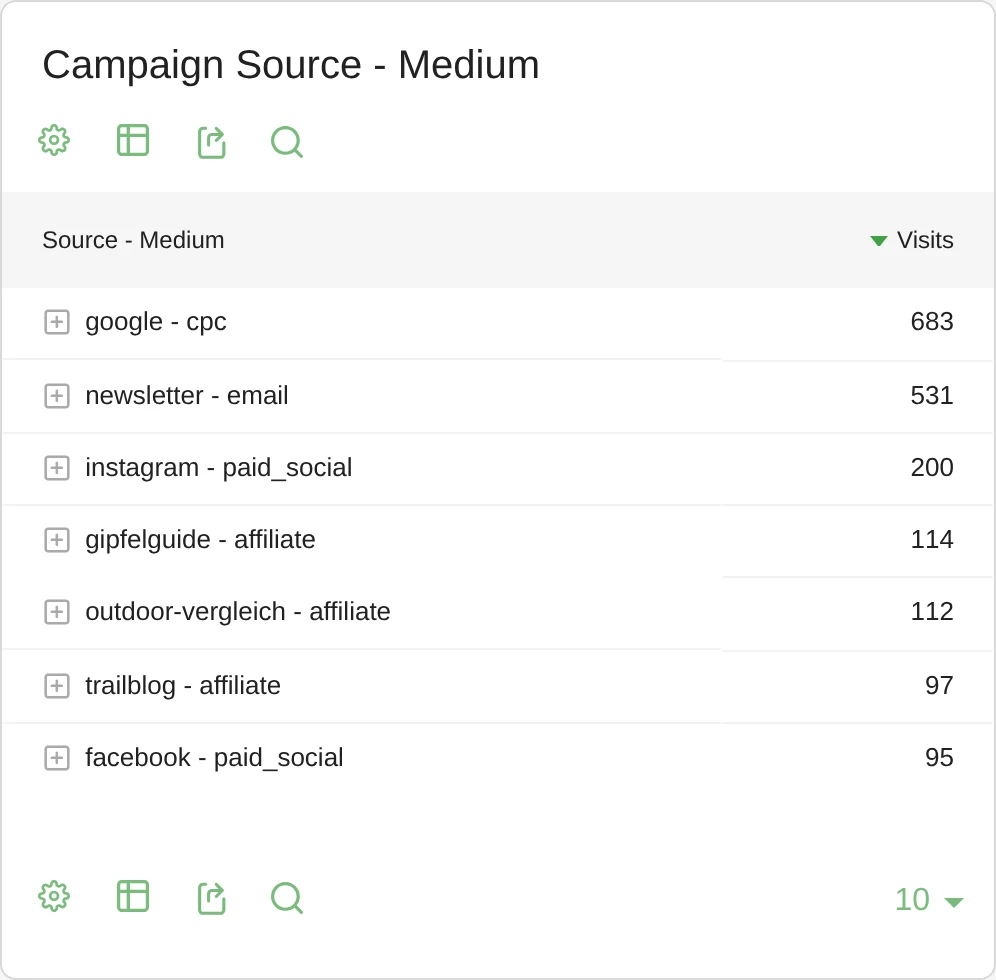
Dos and don'ts: the most common mistakes
Almost every problem with campaign data comes down to a handful of mistakes.
Do:
- Give every link a source, medium and campaign.
- Build links with the URL builder or the template, and document them.
- Open every link yourself before publishing and check it in Matomo.
- Use separate values per location, variant or ad group.
Don't:
- Mix MTM and UTM in one link.
- Swap source and medium.
- Type values from memory:
facebook,Facebookandfbare three sources. - Use spaces, accented letters or special characters.
- Add a second
?when the target URL already has one. Further parameters are added with&. - Use link shorteners and redirects without checking them. Some drop the parameters on the way.
If a campaign does not show up at all, the usual suspects are an excluded own IP address, a declined consent banner, an ad blocker, missing Matomo tracking on the landing page or an email client that rewrites links.
The template: plan and document campaigns
To make naming rules stick, we manage campaigns in a spreadsheet. Our template is free to use:
Download the campaign tracking template (Excel)
It has five sheets:
- Guide: the steps at a glance.
- Campaigns: every campaign once, with ID, period, owner, budget, channels and status.
- URLs: one row per link. You choose the style (
mtmorutm) and enter the values, a formula builds the full URL. It also uses&instead of?when the target URL already has parameters. - Conventions: the MTM and UTM mapping, the golden rules and your team's allowed values.
- QR checklist: twelve checks before every print approval.
Light yellow cells are input fields, and you can overwrite or delete the example rows.
Google Ads: pass the campaign name automatically
Matomo does not read the Google Ads click ID gclid. A click on an ad without further parameters therefore appears as an organic visit from Google, with "Keyword not defined". The fix is campaign parameters that Google Ads appends to every final URL automatically.
There are ValueTrack parameters for IDs, keywords and ads, such as {campaignid}, {adgroupid}, {keyword} and {creative}. There is none for a campaign's name. You pass it through a custom parameter that you set once per campaign. Here is how:
-
Add a custom parameter to each campaign. In each campaign's settings you will find the custom parameter under the URL options: name
campaign, value the readable campaign name following your convention, for examplehosting-brand-us. The name can be up to 16 characters; keep the value short and free of spaces, because Google inserts it as it is. -
Set the final URL suffix for the account. In the account settings under Tracking, enter this in the "Final URL suffix" field:
mtm_source=google&mtm_medium=cpc&mtm_campaign={_campaign}&mtm_cid={campaignid}&mtm_kwd={keyword}&mtm_group={adgroupid}&mtm_content={creative}The same line in UTM style:
utm_source=google&utm_medium=cpc&utm_campaign={_campaign}&utm_id={campaignid}&utm_term={keyword}&utm_content={creative} -
Keep auto-tagging on. Google Ads needs the
gclidfor its own conversion tracking. It does not interfere with the Matomo parameters.
Why the suffix rather than the tracking template? Since parallel tracking became mandatory for Search, Shopping, Display, Video and Performance Max campaigns, Google's developer documentation recommends putting landing page parameters into the final URL suffix; the tracking template is meant for redirects through tracking services. Older guides, including Matomo's own post from 2017, still use a tracking template of the form {lpurl}?mtm_source=google&…. Move these parameters into the suffix and set them in one place only.
Three things to know:
- The most specific suffix wins. A suffix at campaign, ad group, ad or keyword level replaces the account suffix completely; it is not merged.
- Performance Max does not fill everything.
{keyword},{adgroupid}and{creative}stay empty there. To tell asset groups apart, give these campaigns their own complete suffix, because it replaces the account suffix:mtm_source=google&mtm_medium=cpc&mtm_campaign={_campaign}&mtm_cid={campaignid}&mtm_group={assetgroupid}. - Campaigns without the parameter stay nameless. If a campaign lacks the custom parameter,
mtm_campaignstays empty and Matomo does not detect a campaign. So add it whenever you create a campaign.
QR codes and print
A printed code cannot be fixed afterwards. So here more than anywhere: test first, then print.
- One value per location. If posters in five places carry the same code, you only see a total. With
mtm_placement=station-north(in UTM style viautm_content) you can tell the locations apart. - Print it large enough. As a rule of thumb: at least 2 × 2 cm on flyers, 5 × 5 cm on roll-up banners, 8 cm and more on posters. The greater the reading distance, the larger the code.
- Dark on light, with a quiet zone. Light codes on dark backgrounds and codes that run to the edge are hard for many cameras to read.
- Scan with two devices. Once with an iPhone, once with Android, and approve printing only afterwards.
- Add a short address. A readable address such as
example.com/springfor typing, which redirects to the full campaign URL.
The 60-second test
Before a link goes out, this test takes a minute and saves weeks of missing data:
- Copy the link and open it in a private browser window, so an excluded own IP address or old cookies do not get in the way.
- Check that the right page loads in the right language.
- Look in Matomo under Visitors › Visits Log. The visit appears there within seconds, with the campaign name and, with Marketing Campaigns Reporting, also source and medium.
- If the values are right, mark the link as tested in your documentation.
The other reports only show new data after the next archiving run, after minutes or hours depending on your setup.
You will find the URL builder in Matomo under Acquisition › Campaign URL Builder. It builds links in MTM style; with Marketing Campaigns Reporting it offers all fields, without the plugin only name and keyword.
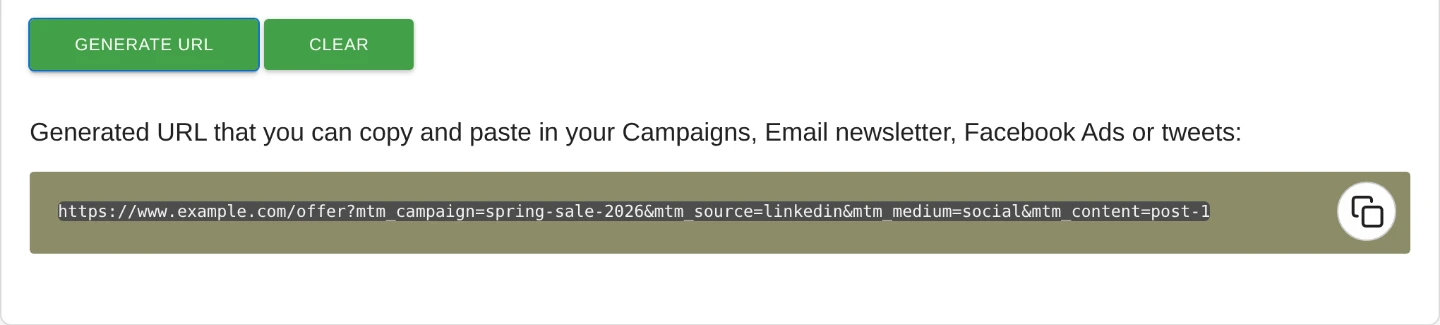
Reports and analysis
Once the links are clean, analysis pays off. The most important places in Matomo:
- Acquisition › Campaigns shows, with Marketing Campaigns Reporting, the reports Campaign Names, Keywords, Sources, Mediums, Contents, IDs, Groups, Placements and the Source - Medium combination. Clicking a row opens the next level, for example the contents of a campaign.
- Goals shows the same dimensions further down the page, with conversions, conversion rate and revenue per campaign.
- Segments limit all reports to a group of visitors, for example all visits with
medium=email. Note that segments filter whole visits, not single actions. A segment "Page URL contains /contact" shows all pages of the visits in which the contact page was viewed. - Comparisons put periods or segments side by side, for example the spring sale against the same period last year.
Three questions a campaign report should answer: Which campaigns bring visits that actually convert, not just clicks? Which variant (content) wins within a campaign? And what does a conversion cost per channel? For the last one you need the costs from the ad platforms, because Matomo does not know click prices by itself.
Attribution: who gets the conversion?
Hardly anyone buys on the first visit. A typical path looks like the one in the figure: first an ad, days later a newsletter, and finally a direct visit from a bookmark in which the order is placed. Which touchpoint gets the conversion?
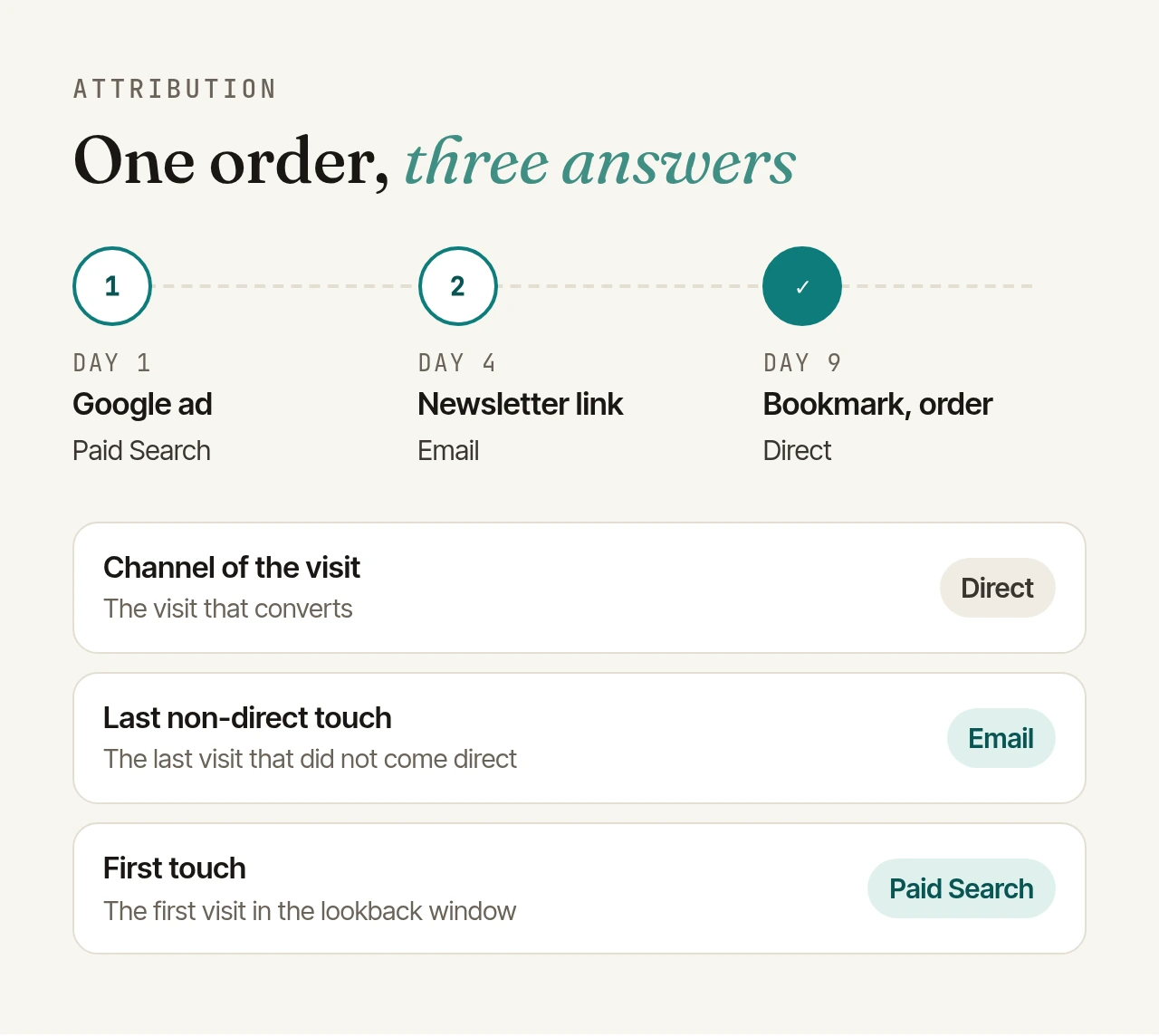
Out of the box, Matomo credits a conversion to the last known referrer. The tracker remembers campaign and referrer in the _pk_ref cookie, for six months by default. With the tracker setting setConversionAttributionFirstReferrer, the first referrer counts instead. That is why a campaign report under Goals can show conversions but no visits: the visit came direct, the conversion belongs to the earlier campaign. Without cookies, for example when a visitor has not agreed to tracking with cookies, there is no such memory. Then only the visit in which the conversion happens counts. In the journey from the figure, the order would therefore go to the newsletter with cookies and to Direct without them.
Out of the box, Matomo only knows coarse channel types such as search engines, websites or campaigns, and only one model at a time, the last or the first referrer. This is where our ChannelGrouping plugin comes in:
- Channels instead of hundreds of sources. It groups search engines, social networks, campaigns and referrers into channels. The default grouping follows the Google Analytics 4 default channel groups and detects paid visits by their medium, such as
cpc,ppc,retargetingor anything starting withpaid.linkedinwithcpcends up in Paid Social,googlewithcpcin Paid Search. - Click IDs. It recognises ad clicks from Google, Microsoft, Meta, LinkedIn and other networks by their click ID, even without campaign parameters. Only the type of click ID is stored, never its value.
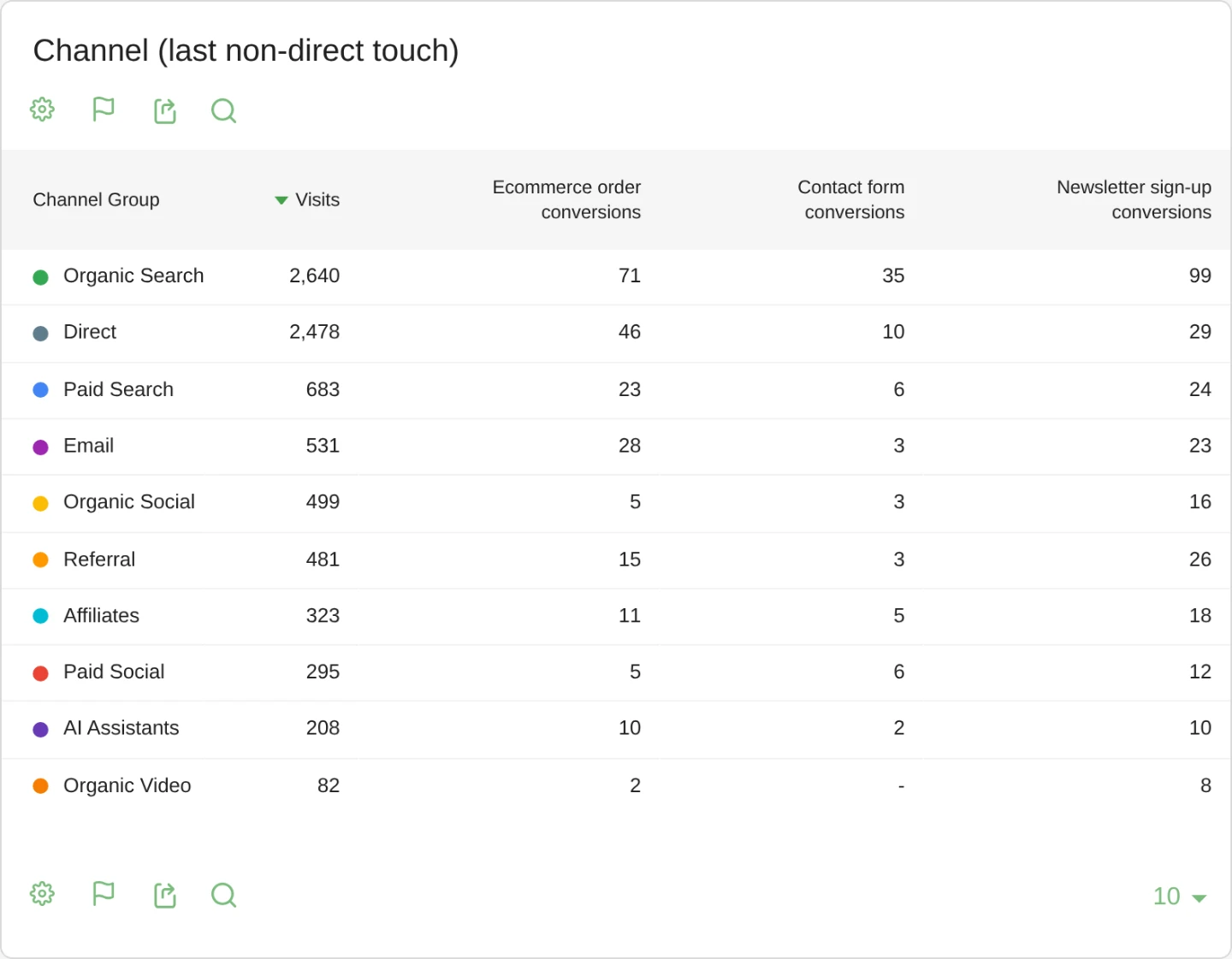
- Attribution reports. Under Goals and Ecommerce › Sales there are two additional reports: "Channel (last non-direct touch)" credits a conversion from a direct visit to the channel the visitor last came through. "Channel (first touch)" credits it to the channel of the first visit. The lookback window is 90 days by default.
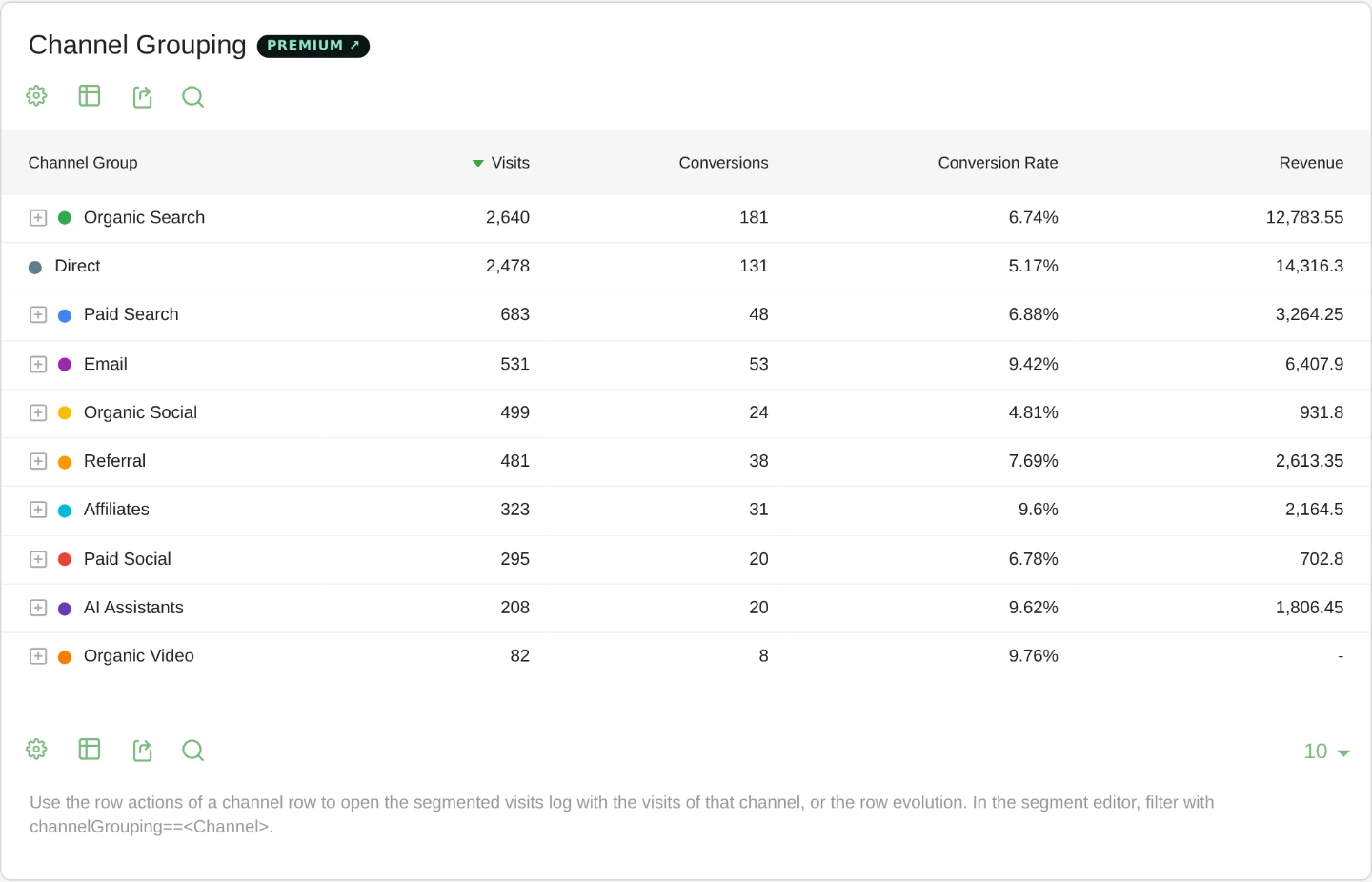
The Channel Grouping report itself counts conversions under the channel of the visit in which they happen. How much the picture shifts with the other two views is shown by the comparison from our demo instance. The total number of conversions stays the same, but Direct loses a third under last non-direct touch, while Organic Search, Referral and the paid channels gain. Some remain with Direct: visitors who never came any other way, or whose earlier visits Matomo cannot link.
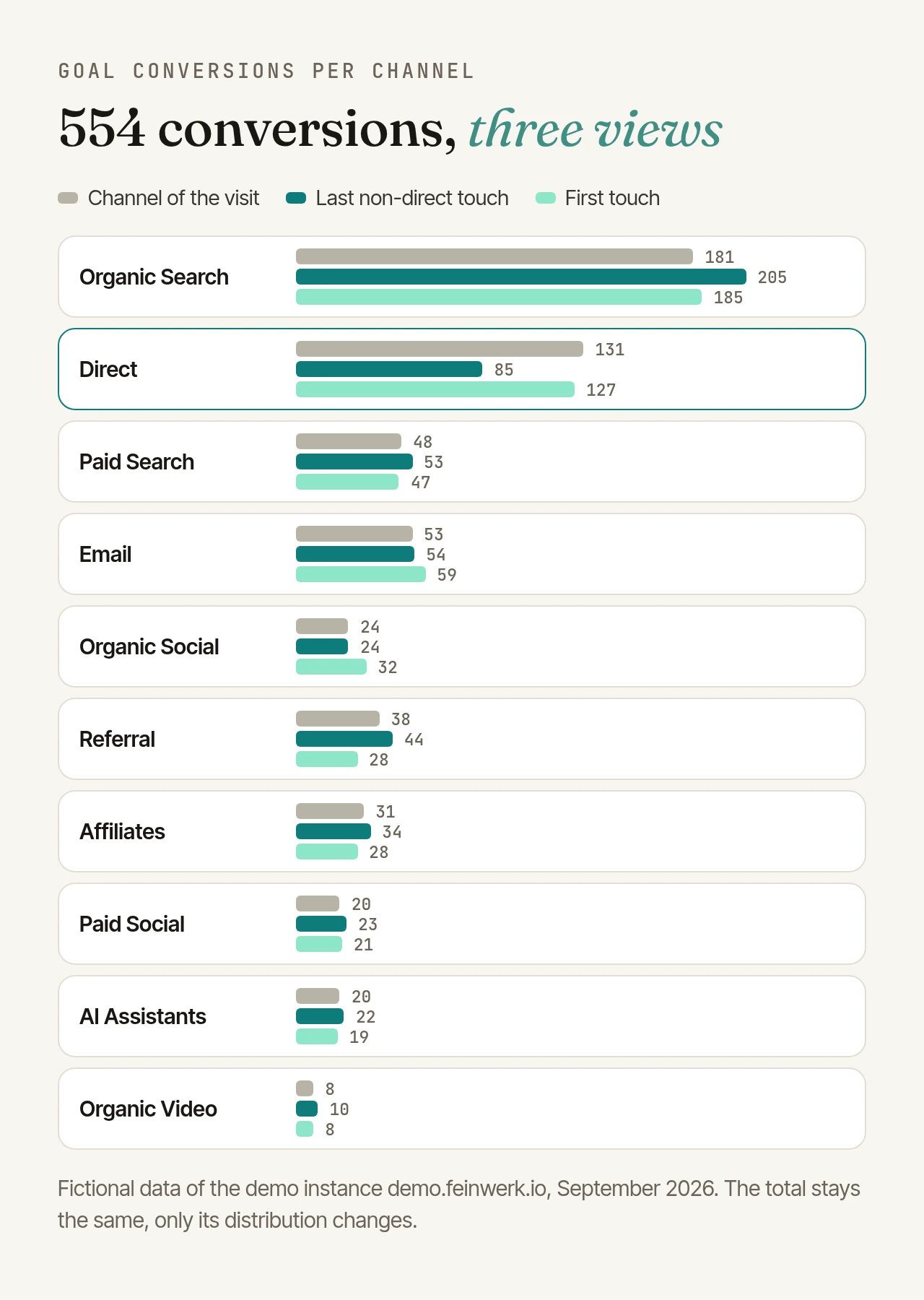
Which model is right? None on its own. Last non-direct touch answers "What triggered the purchase?", first touch "What brought the customer to us?". Anyone allocating budget should know both. For models that spread the credit, such as linear or position based, Matomo offers the paid Multi Channel Conversion Attribution plugin.
The limits apply to every model: Matomo recognises returning visitors by their visitor ID. Without cookies or a user ID, earlier visits are missing, as are visits on other devices, and visits whose raw data has been deleted no longer count. Attribution in Matomo is therefore a good approximation, not a complete record.
Checklist
- Marketing Campaigns Reporting is active.
- Your team has agreed on allowed values for source, medium and campaign.
- Every link has a source, medium and campaign, all lower case, without spaces or accented letters.
- One style per link, MTM or UTM.
- Every link is recorded in the campaign documentation.
- Every link was opened in a private window and checked in the Visits Log.
- Google Ads passes the campaign name through a custom parameter and the final URL suffix; auto-tagging stays on.
- QR codes carry their own values per location and were scanned with two devices.
- For every report it is clear which attribution model a number shows.