On 22 October 2026, Matomo released version 5.14.2, which its changelog calls a patch release with an important security notice. It follows the two PHP vulnerabilities CVE-2026-109618 and CVE-2026-109619, known as "PHP2Shell", which PHP fixed a day earlier. Matomo is clear about it: updating Matomo alone does not fix these vulnerabilities. 5.14.2 only warns you when your server reports an affected PHP version. If you self-host Matomo, which is one of its biggest selling points, you also own everything underneath it.
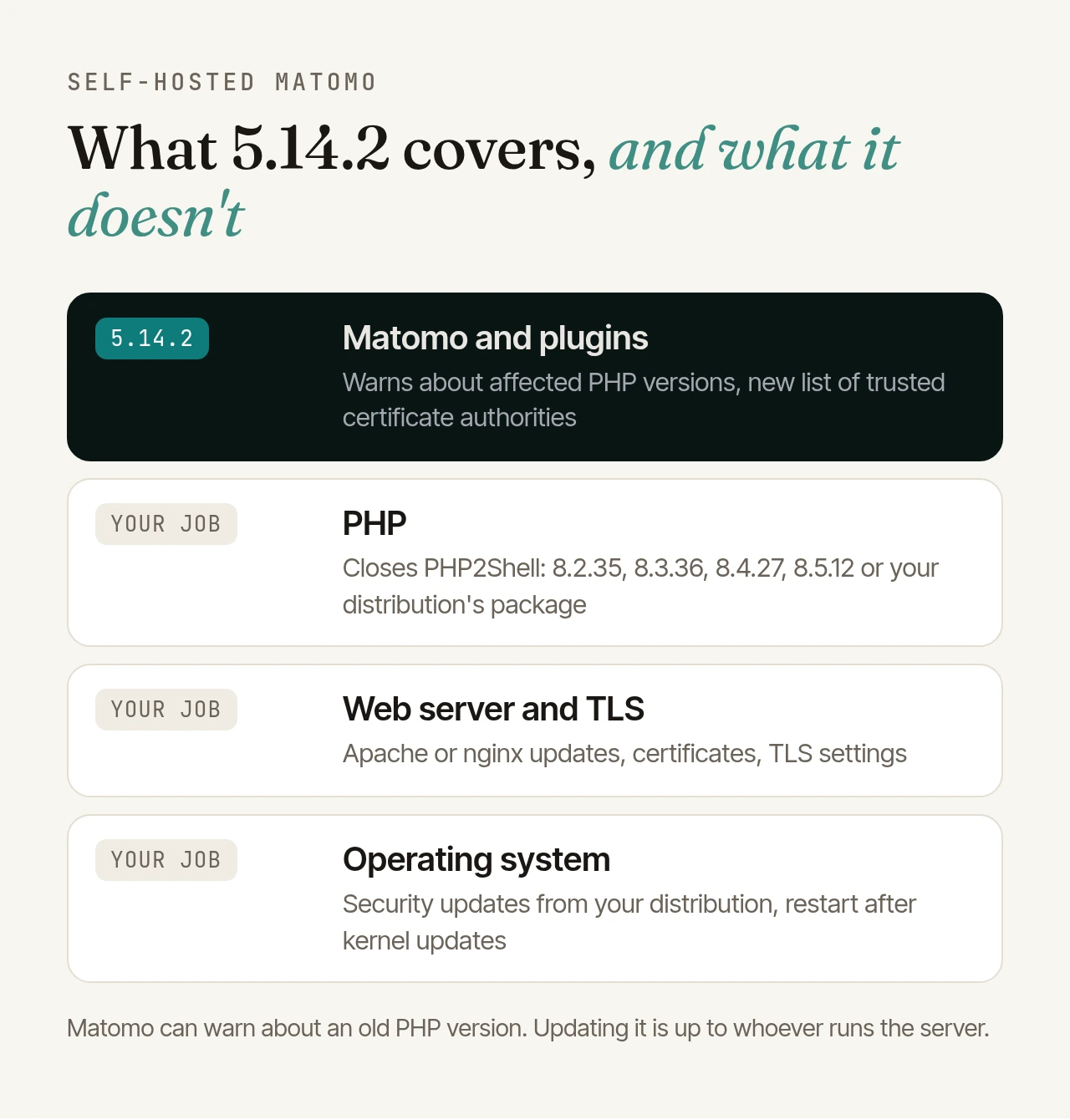
What's in 5.14.2#
Apart from the version number, the release contains exactly two changes and no database update at all:
- A warning about affected PHP: Matomo compares the server's PHP version with the fixed releases 8.2.35, 8.3.36, 8.4.27 and 8.5.12. If it is older, or the server still runs PHP 8.1 or below, every signed-in user sees the notice "Urgent PHP security update required". You can close it, but it comes back on the next page load.
- A refreshed list of trusted certificate authorities: for outgoing HTTPS connections via cURL, Matomo ships its own list, the composer/ca-bundle package. Matomo uses these connections for the Marketplace, update checks and downloads, among other things. Version 1.6.0 of 20 October removes three emSign root certificates, one of them explicitly because it had cross-signed compromised intermediates from the provider eMudhra. This has nothing to do with PHP2Shell.
For Matomo 6, both changes came with beta 7 on the same day, alongside other fixes. The current version there is release candidate 1 of 30 October. The built-in updater offers 5.14.2, and a superuser has to start the update.
Why the warning isn't always right#
Matomo only looks at the version number. Many Linux distributions backport security fixes without changing it:
- Ubuntu, for example, lists the vulnerabilities as fixed in PHP 8.3.6 on Ubuntu 24.04 once the current package is installed. Matomo still warns.
- Debian shipped the new versions itself, 8.2.35 in Bookworm and 8.4.27 in Trixie, so the warning is accurate there.
- PHP 8.1 and older are always flagged, even when your distribution has patched them (such as PHP 8.1.2 on Ubuntu 22.04) or they were rebuilt with the PHP team's source patches.
That is why the notice explicitly asks you to confirm that your distribution's security fixes have been applied. Its security notice counts, not the version number. So that you can switch the warning off once you have checked, Matomo has built a setting: disabled_notifications[] = PhpSecurityAdvisory_2026_10_21 in the [General] section of config.ini.php. It is in Matomo 6 from beta 9 and planned for Matomo 5.14.3, but not in 5.14.2.
The other way round, the warning only covers the PHP that serves the Matomo interface. If your tracking endpoint runs in a different PHP pool or on another server, you need to check that one yourself.
Self-hosting means owning the whole stack#
Running Matomo on your own servers is a strong argument: the data stays with you, and you decide what happens to it. It also means keeping every layer up to date, not just Matomo. A checklist:
- Matomo and plugins: apply updates promptly, take a backup first and read the changelog. Marketplace and third-party plugins are part of this.
- PHP: use a version that still gets security fixes. PHP 8.2 gets them only until 31 December 2026, PHP 8.3 until the end of 2027, PHP 8.4 until the end of 2028 and PHP 8.5 until the end of 2029. After an update, restart PHP-FPM or Apache and check which version your web server and archiving cron job actually run. What to do about PHP2Shell in detail is in our post PHP2Shell: what Matomo operators should do now.
- Web server and TLS: keep Apache or nginx current through your distribution, renew certificates automatically and offer only current TLS versions.
- Operating system: apply your distribution's security updates regularly, automatically where you can, and reboot after kernel updates.
- Stay informed: follow your distribution's security notices, the BSI's warnings and Matomo's changelog. Waiting for Matomo's warning is late: it arrived a day after the PHP release, and it only works once 5.14.2 is installed.
- Harden: SELinux or AppArmor, request limits and a WAF limit the damage when a vulnerability is exploited faster than you can patch. More on that in the PHP2Shell post, too.
How we handled PHP2Shell#
For all servers we look after, meaning the Matomo instances we host ourselves and the servers of our SLA customers, 21 October went like this:
- Right after the warning, before the patches:
- Switched off session upload progress (
session.upload_progress.enabled=0), one of the attack paths PHP itself names. - Adjusted the firewall.
- Added monitoring that reports crashed PHP processes immediately. Running out of memory and fatal errors are among the ways to trigger these vulnerabilities, so crashed processes are an early warning sign.
- Disabled certain PHP functions that would help an attacker after a break-in.
- Switched off session upload progress (
- At 14:00 UTC, 16:00 German time: as soon as the patches were out, we updated the PHP versions straight away.
The immediate measures are no substitute for the update, as PHP itself says. But they bridged the hours until the patch and reduced the attack surface until then. That is exactly what hosting and SLA operations are for: someone follows the situation, knows your servers and acts without you having to worry about it. The servers of our SLA customers were patched on the day of the release, well ahead of the contractual deadline. Under an SLA, the commitment is the agreed deadline.
A fixed process instead of patching on demand#
Do you have a standing process for PHP updates, or do you only patch when Matomo warns you? PHP2Shell showed how little time there is: the patches arrived on 21 October at 16:00 German time, and the BSI expected broad exploitation within a few hours. If you first have to find someone responsible, you lose that time.
If you'd rather not do this yourself, there are two ways:
- Matomo hosting: for the instances we host ourselves, we apply security updates for PHP, Matomo and the server, by severity, critical ones right away. More on our Matomo hosting page.
- SLA operations on your infrastructure: the baseline covers critical security updates within 2 business days of release, plus hardening and monitoring around the clock, with every value adjustable in the contract. More on our SLA operations page.
And if you have found a process that works well: tell us how you handle it.