Which browsers do newsletter visitors use? Which events happen on which page? Do campaigns convert worse on smartphones than on desktop? In Google Analytics 4, the secondary dimension and Explorations answer questions like these. Teams moving to Matomo often look for both in vain: every Matomo report shows the one dimension it was built for.
This guide covers what GA4 offers here and where it stops, which tools Matomo brings out of the box, and how our free plugin DataExploration lets you combine dimensions on the spot, straight from your website's raw data. It then covers how this works on large websites and what to do when a query takes too long, and closes with which tool fits which question.

What GA4 offers: secondary dimensions and Explorations#
In GA4 detail reports, the plus next to the dimension menu adds a second dimension. The report then shows one row per combination, for example source and device category. The secondary dimension is temporary: once you leave the report, it is gone.
For more there are Explorations, which Google positions for quick ad hoc queries, above all the free-form exploration. Google describes it as a crosstab layout. It takes up to five dimensions as rows, up to two as columns and up to ten metrics in the table, as a table, donut, line, scatter or bar chart, or a geo map. An exploration is visible only to you at first and can be shared with the property, where others can view but not edit it.
Three limits are worth knowing:
- Retention: Explorations only use event data within the retention period, 2 or 14 months for standard properties (Analytics 360: up to 50 months).
- Sampling: when a query on a standard property processes more than 10 million events, the result may be based on a sample.
- (other): when a table exceeds its row limit, GA4 groups the rest into an "(other)" row, in reports and explorations alike. Google notes that reports with secondary dimensions, filters or comparisons are more likely to show it.
How the two platforms compare overall is in our article GA4 now has dashboards: is Matomo still the better choice?, and the move itself in our migration plan from GA4 to Matomo.
What Matomo offers out of the box#
Matomo reports are archived: Matomo processes the raw data into reports ahead of time, ideally every hour by cron. That is why reports open fast, even over years. In return, every report is built for one dimension. A few tools still let you dig deeper:
- Events with a switchable secondary dimension: the event category, action and name reports show a second level per row, which you switch at the bottom of the report, for example from action to name.
- Subtables and flat reports: many reports have sub-rows, such as campaigns with their keywords or pages in folders. The cog icon shows them as a flat list.
- Row evolution and the segmented visits log: hovering a row shows icons for that row's evolution over time and for all visits behind it.
- Segments: a segment narrows every report to certain visits, such as smartphones or one campaign. Segments always apply to entire visits, not single actions.
Two traits of archiving are worth knowing. First, Matomo keeps only the largest rows per report, for example the top 500 pages or 1,000 websites, and the rest goes into "Others". Second, reports can only be re-processed from raw data that still exists: if Administration › Privacy › Anonymize data deletes old raw data regularly, older periods only have the finished reports.
What is missing is the quick question in between: any two dimensions side by side, without creating a segment first or waiting for archiving.
Ad hoc analysis on raw data with DataExploration#
DataExploration is one of our free plugins for Matomo and adds Explorations › Free-form table to the reporting menu. Pick a dimension, optionally a second one and up to five metrics, and the table is built at once from the raw data of the chosen period. Nothing is archived and no report is created. The plugin runs on Matomo 5 from version 5.12.
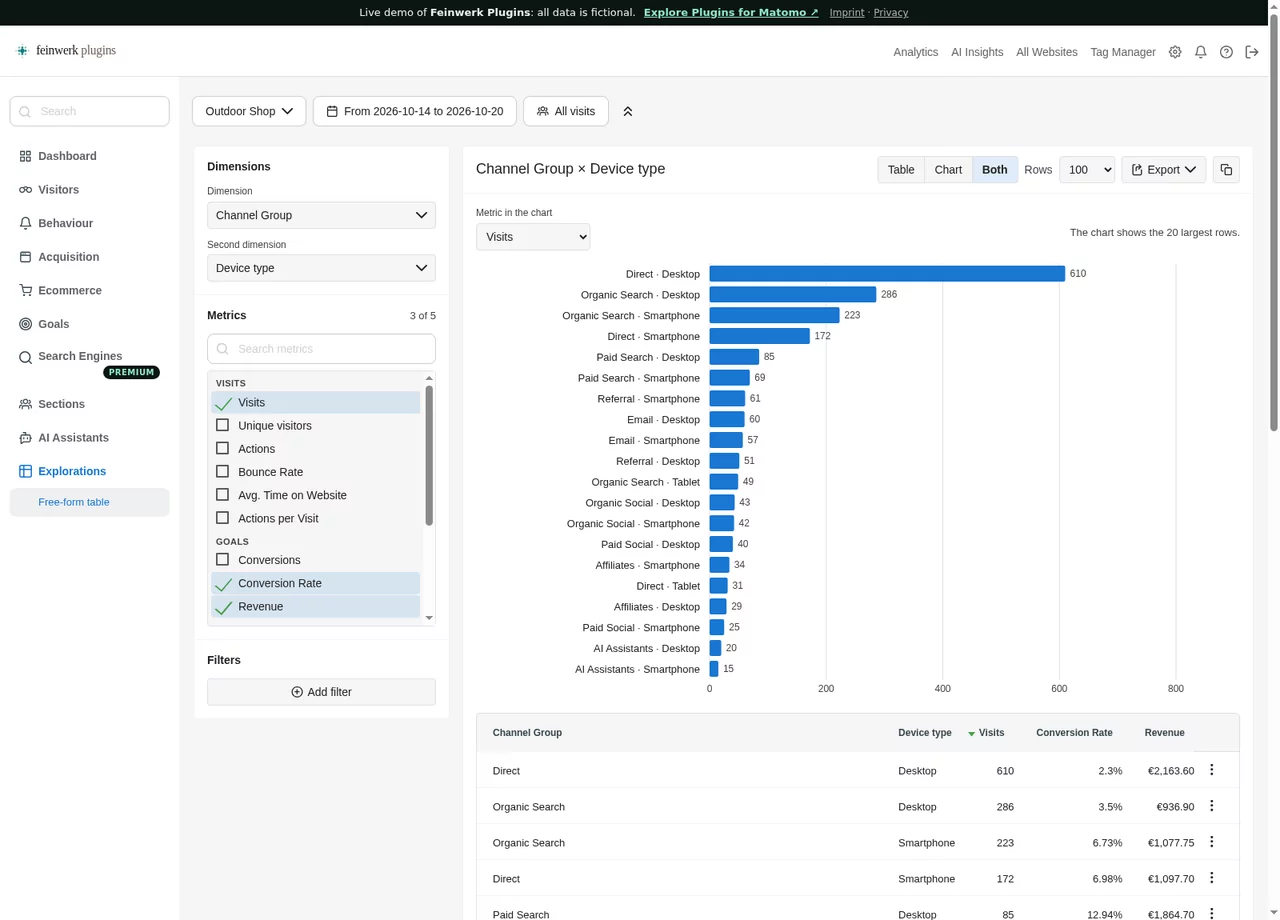
- Dimensions: among others channel type, referrer name, campaign name, country, region, city, language, device type, operating system, browser, resolution, visitor type, date, day of the week, hour, entry and exit pages, page URL, page title, event category, action and name, downloads, outlinks, site search keywords and your Custom Dimensions. The free Marketing Campaigns Reporting plugin adds campaign source and medium. Our plugin ChannelGrouping adds your own channel groups.
- Metrics: visits, unique visitors, actions, actions per visit, bounce rate, average visit duration, conversions, conversion rate and revenue (for all goals or one goal), pageviews, unique pageviews, events, event value, downloads and outlinks.
- Filters: every Matomo segment, plus up to five row filters on the chosen dimensions and metrics, such as "page URL contains /shop" or "visits greater than 100".
- Table, chart or both: the chart shows one metric, as bars per row or as a line over time for date, hour and day of the week.
- From your reports: below many standard reports, an icon labelled Open in exploration opens the report as an exploration, with its dimension, period and segment.
- Share: export as CSV or TSV, and every exploration lives in its link.
For a step-by-step example, see our GA4 Explorations alternative for Matomo.
One thing to keep in mind when reading: when a visit metric stands next to an action dimension, such as visits next to the page URL, it counts the visits with that page. A visit with three pages counts on three rows, which is why the column says "Visits with this action". And some combinations exist only here: no standard Matomo report shows pageviews and events per page URL side by side.
Large websites and long periods#
Because an exploration reads raw data, its run time grows with the rows it reads. With visit dimensions such as channel, country or device, that is the visits; with pages, events or downloads, the actions, often many times more. The plugin therefore protects your Matomo in several ways:
- At most 31 days per exploration and up to 1,000 rows.
- Counted first: the page counts the visits of the period. Above a quarter of the threshold (2 million visits by default) it shows a warning, above the threshold the page offers the most recent days of the period that fit.
- Time limit: a query that takes longer than 30 seconds is stopped, provided the database supports it. After a slow query the page says what makes it faster.
- At most two at the same time, and with a read replica configured, queries run there.
- Cached: results are kept for an hour, or five minutes when the period includes today. Going back to an earlier combination is instant.
When the time limit stops an exploration, these steps help, roughly in this order:
- Choose a shorter period, for example one week instead of a month.
- Add a segment, so fewer visits are read.
- Use a visit dimension instead of pages or events, or leave out the action metrics.
- As a super user, set up a read replica (the
[database_reader]section inconfig.ini.php), which explorations use automatically, and raise the time limit under Administration › System › General settings when the database has room for it. Large instances benefit from enough memory for temporary tables and a buffer pool that holds the indexes of the log tables. - For questions you ask regularly over long periods, use the matching standard report with a saved segment that Matomo pre-processes.
Which tool for which question#
| Question | Tool |
|---|---|
| How does a metric develop over months and years? | Matomo's archived reports |
| A fixed combination you need every week, also on a dashboard or by email | The matching standard report with a saved, pre-processed segment |
| A quick question with any two dimensions for the last days or weeks | DataExploration |
| What did individual visitors do? | Visits log and visitor profile |
| Which paths lead to a conversion? | Path analysis, see Path analysis in Matomo |
Explorations and archived reports work together: the exploration finds the combination that answers the question, and if you need it for good, you save a segment for it and have it pre-processed.