Empty reports, numbers that stop at the day before yesterday, a monthly total that changes overnight, a cron job that never finishes: in Matomo, these symptoms almost always lead back to the same place, the archiving process. Once you know how it works, the cause is usually quick to find.
This article explains the principle, the setup Matomo recommends, the common failures with their fixes and the tools for diagnosis. As of October 2026, Matomo 5; the commands and settings below also exist in Matomo 6.
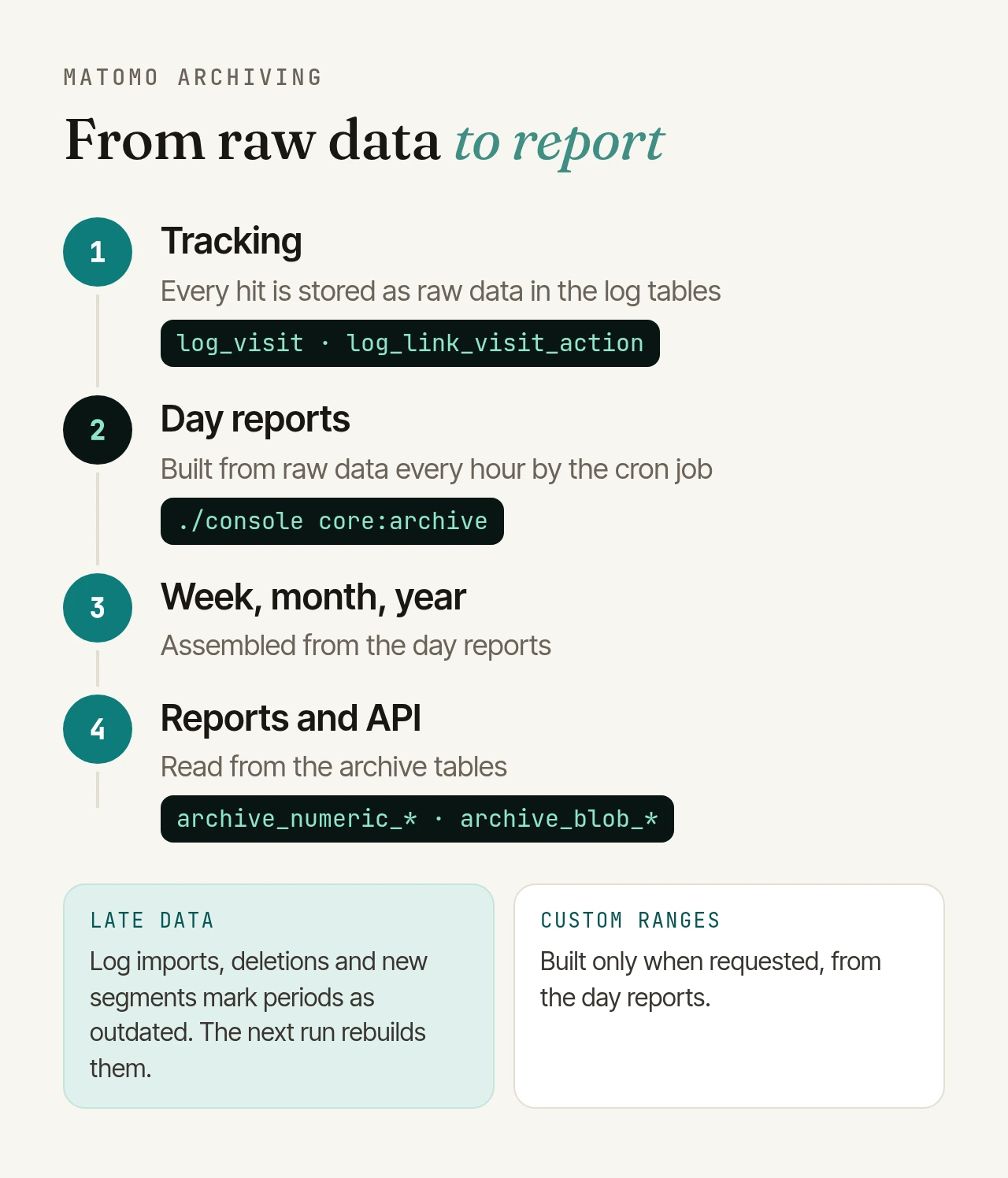
How Matomo archiving works#
Matomo first stores every tracked action as raw data in its log tables. Reports, however, are not recalculated on every view but read from archives: pre-aggregated metrics and tables, kept per website, period and segment. Day reports are built from raw data; weeks, months and years are built from the day reports. Everything lives in monthly tables such as matomo_archive_numeric_2026_10 and matomo_archive_blob_2026_10.
One of two triggers decides when the work happens:
- Browser-triggered archiving: when someone opens a report and no current archive exists, Matomo builds it on the spot. Convenient, but slow at scale.
- Cron archiving: the
core:archivecommand runs in the background on a schedule and works through a queue. Matomo recommends it as soon as a site gets more than a few hundred visits a day.
Matomo fills that queue itself. Today is re-archived when there are visits and the existing archive is older than the configured lifetime. Yesterday is processed once more, in full, after the date changes. Add to that every period marked as outdated.
The recommended cron setup#
Matomo recommends an hourly cron job that runs as the web server user, so file permissions stay consistent:
# /etc/cron.d/matomo-archive
MAILTO="admin@example.org"
5 * * * * www-data /usr/bin/php /var/www/matomo/console core:archive --matomo-domain=https://analytics.example.org > /var/log/matomo-archive.log
Output goes to a log file outside the web root (it contains internal details); errors are mailed to MAILTO. The --url option you will find in older guides has been deprecated since Matomo 5 in favour of --matomo-domain, and the old misc/cron/archive.sh script is gone in Matomo 6 (see our Matomo 6 upgrade checklist). Test it first as the web server user (su www-data -s /bin/bash -c "…"); it should end with a summary without errors.
Then switch off browser-triggered archiving. Under Administration > System > General settings, set "Archive reports when viewed from the browser" to No and "Archive reports at most every X seconds" to 3600. That alone is not enough, because custom segments would still trigger archiving. Only this line in config/config.ini.php makes it reliable:
[General]
browser_archiving_disabled_enforce = 1
If a run takes an hour or longer, Matomo suggests scheduling it less often, for example every 2, 6 or 12 hours.
Invalidation: why numbers change after the fact#
To invalidate means that Matomo marks an archive as outdated and the next run rebuilds it from raw data. Until then, Matomo keeps showing the old numbers. This happens automatically in cases such as:
- data arriving for past days, for example when you import web server logs or send tracking requests with the
cdtparameter, - visits being deleted, through Matomo's GDPR tools or with our free Delete Visits Filter plugin for bot traffic and test data,
- segments being created or edited; some plugins with their own reports also reprocess the past this way.
When a day is invalidated, the week, month and year above it are invalidated too. To do it by hand:
./console core:invalidate-report-data --dates=2026-09-01,2026-09-30 --sites=1
Narrow it down with --periods, --segment and --cascade (also covers the days inside a week or month); --dry-run shows what would happen. The rebuild happens on the next core:archive run.
You need the raw data. If you have enabled regular deletion of old raw data in the privacy settings, reports for deleted periods cannot be rebuilt. That is why core:invalidate-report-data skips such dates on its own. The --ignore-log-deletion-limit option overrides this safeguard; it is meant for special cases such as data imported from Google Analytics, which never had raw logs.
Segments: real-time or pre-processed#
When you save a segment, you choose whether its reports are processed in real time (when viewed) or pre-processed by the cron job. Real time suits low traffic or rarely used segments, but only works while the browser is allowed to archive.
With the recommended setup above, the cron job processes every saved segment, and new segments are created as pre-processed automatically. Unsaved ad-hoc segments, for example a segment= parameter in an API call, are no longer processed at all. Instead of data, Matomo says the segment is not applied for performance reasons. Save such segments and query them by idSegment.
Two consequences for operations:
- Every segment costs processing time, for every website and every period. Lots of segments are a common reason for long runs.
--skip-segments-todayarchives segments only for yesterday, not for today. - New segments backfill the past: with the default
process_new_segments_from = "beginning_of_time", up to seven years back. On large instances, limit this, for example with"last30"(30 days before the segment was created).
Common causes and how to fix them#
The cron job is not running#
Empty reports with browser archiving switched off usually mean that core:archive is not running. Typical reasons are a wrong PHP path, the wrong user, or a server move that left the cron job behind. After a longer gap, according to Matomo's developer documentation, the archiver ignores visits that may have arrived between the last run and yesterday, so invalidate that period explicitly.
Not enough memory#
If a run fails with "Allowed memory size of … bytes exhausted", PHP ran out of memory. What counts is the PHP configuration for the command line, which often uses a different php.ini than the web server (php -i | grep "Configuration File"). Matomo recommends at least 2 GB, and many installations use 4 to 8 GB. To test: php -d memory_limit=8G console core:archive. By itself, Matomo only raises the limit to 768 MB when archiving.
Overlapping runs and stuck entries#
If cron starts a run every hour but a run takes two, several archivers end up running at once. Matomo caps this per server with --concurrent-archivers (default: 3); above that, a new run stops with "Archiving will stop now because … archivers are already running". If you deliberately run archivers in parallel, Matomo advises starting them a few seconds or minutes apart. Be careful with --force-idsites: it lets two runs process the same website at once.
If a run is killed (out of memory, a reboot, a deployment), its queue entries stay marked as in progress. Matomo only treats them as failed after 24 hours (archive_failure_recovery_timeout). Since Matomo 5.3 you can reset them, but only when you are sure no run is still active:
./console core:reset-invalidations --idsite=1 --older-than="1 hour ago" --dry-run
MySQL errors and max_allowed_packet#
According to Matomo, "MySQL server has gone away" has two main causes: the database closed the connection after a timeout (check wait_timeout; Matomo gives 28800 as an example), or a packet was too large. For the latter, raise max_allowed_packet in my.cnf, starting at 128M as Matomo suggests and going up to 1024M on high-traffic sites. The system check already warns below 64 MB.
Huge archive tables#
A growing database is normal: Matomo keeps archives for every day, week, month and year. Scheduled tasks clean up outdated and invalidated archives. If they don't run, for example because of --disable-scheduled-tasks without a separate scheduled-tasks:run, the tables keep growing. ./console diagnostics:analyze-archive-table 2026_09 shows what a table holds. To clean up and reclaim space:
./console core:purge-old-archive-data all
./console database:optimize-archive-tables all
Matomo recommends running both monthly from cron. For database and server tuning, see our article on Matomo performance tuning.
Time zones and day boundaries#
Matomo stores times in UTC but builds days in the website's time zone. A day is complete only once it has ended there and a run has happened afterwards. If you archive only once a day, schedule the run shortly after midnight in the website's time zone, not the server's. Changing a site's time zone only affects reports going forward. For older periods, invalidate and rebuild while the raw data still exists.
Browser archiving still enabled#
If cron and browser archiving both run, both do the work and reports load slowly. The system check then reports "Browser and Auto-archiving enabled". The fix is the setup above, including browser_archiving_disabled_enforce.
Long date ranges#
Custom date ranges, say 1 January to today, are not pre-processed by cron. Matomo assembles them from day reports when they are requested, by default even with browser archiving switched off. That needs memory in the web server's PHP and on large instances easily ends in a 504 gateway timeout. Frequently used ranges can be added to the cron run with archiving_custom_ranges[]. Missing unique visitors in year and range reports are not a bug: Matomo skips them there by default.
Diagnosis: what is running, what is stuck?#
- System check: under Administration > Diagnostic > System Check (or
./console diagnostics:run), "Last Successful Archiving Completion" shows a warning after one day and an error after two when browser archiving is off. It also lists the memory limit, max packet size and the size of the archiving queue. - Archiving status: since Matomo 5.1,
./console diagnostics:archiving-statuscombines the queue, metrics and the effective archiving settings in one report.--with-statsadds instance statistics;diagnostics:archiving-queue,diagnostics:archiving-metricsanddiagnostics:archiving-configshow the parts separately. - The core:archive output: the log shows which website, period and segment is being processed;
-vvvmakes it verbose. To narrow things down, archive a single site with--force-idsites=1 --concurrent-requests-per-website=1, ideally with the regular cron paused.
If the output says "Got invalid response from API request", the archiver is not getting a valid response from Matomo. Check the PHP error log, matomo.log and the web server log; Matomo names SSL, DNS, a proxy or a firewall as common causes.
Archiving is operations, not a one-off setup#
More traffic, new segments or an update change the load, so archiving needs monitoring, not just a cron line. With our SLA operations, monitoring checks endpoint, archiving and database around the clock, including on your own infrastructure. With our managed Matomo hosting, archiving runs as a monitored background job tuned to your traffic.