Your cookie banner is live and your privacy policy is updated. Whether Matomo actually respects the visitor's choice only shows in the browser: does the first request go out before anyone clicks? Do the cookies stay after consent is withdrawn? Does a visitor get a new ID on every page? Such bugs almost always sit between the banner and Matomo.
This guide shows how to wire Matomo to a consent banner: through Matomo Tag Manager or directly through the JavaScript tracker, with a consent management platform (CMP) or a banner you built yourself. For measuring without cookies, see our article on cookieless Matomo. For the planned EU reform of cookie rules, see our piece on the Digital Omnibus.
The legal frame in brief#
Technical orientation, not legal advice. Article 5(3) of the ePrivacy Directive requires consent before information is stored on or read from a visitor's device, unless that is strictly necessary for the service they asked for. Germany implements it in section 25 TDDDG and applies it strictly. The guidance of the German Data Protection Conference (version 1.2, November 2024) translates into four requirements your setup has to meet:
- Nothing before consent: consent must exist before the access. Setting cookies on the first page view and asking afterwards is not allowed.
- Declining costs no extra effort: as a rule, rejecting must not take more clicks or attention than accepting.
- Withdrawal as easy as consent (Art. 7(3) GDPR), for example through an always visible link or icon that opens the settings directly.
- Proof: as a rule it is enough to document the processes you implemented and to store the decision in a cookie without an identifier. Keep old banner texts and configurations.
Matomo classifies Germany as a strict country: according to Matomo, a visitor who declines there also declines cookieless JavaScript tracking. Which categories your banner offers and which legal basis you rely on is for you and your privacy counsel to decide.
Tracking consent or cookie consent#
Matomo has two ways to wait for consent, each with its own set of functions:
| Tracking consent | Cookie consent | |
|---|---|---|
| Before consent | Matomo sends nothing | tracking without cookies |
| Switch on | requireConsent |
requireCookieConsent |
| Consent for this page | setConsentGiven |
setCookieConsentGiven |
| Remember consent | rememberConsentGiven |
rememberCookieConsentGiven |
| Withdraw | forgetConsentGiven |
forgetCookieConsentGiven |
| Cookie that remembers | mtm_consent |
mtm_cookie_consent |
With tracking consent, Matomo holds back the requests of the current page and sends them as soon as your banner reports consent. So the first page view is not lost when someone clicks a few seconds later. Cookie consent tracks right away, just without cookies. That only fits where your privacy counsel considers cookieless tracking without consent permissible. For a classic opt-in, tracking consent is the obvious choice.
Who remembers the decision?#
Matomo offers two ways to keep a visitor's consent:
- Matomo remembers it: your banner calls
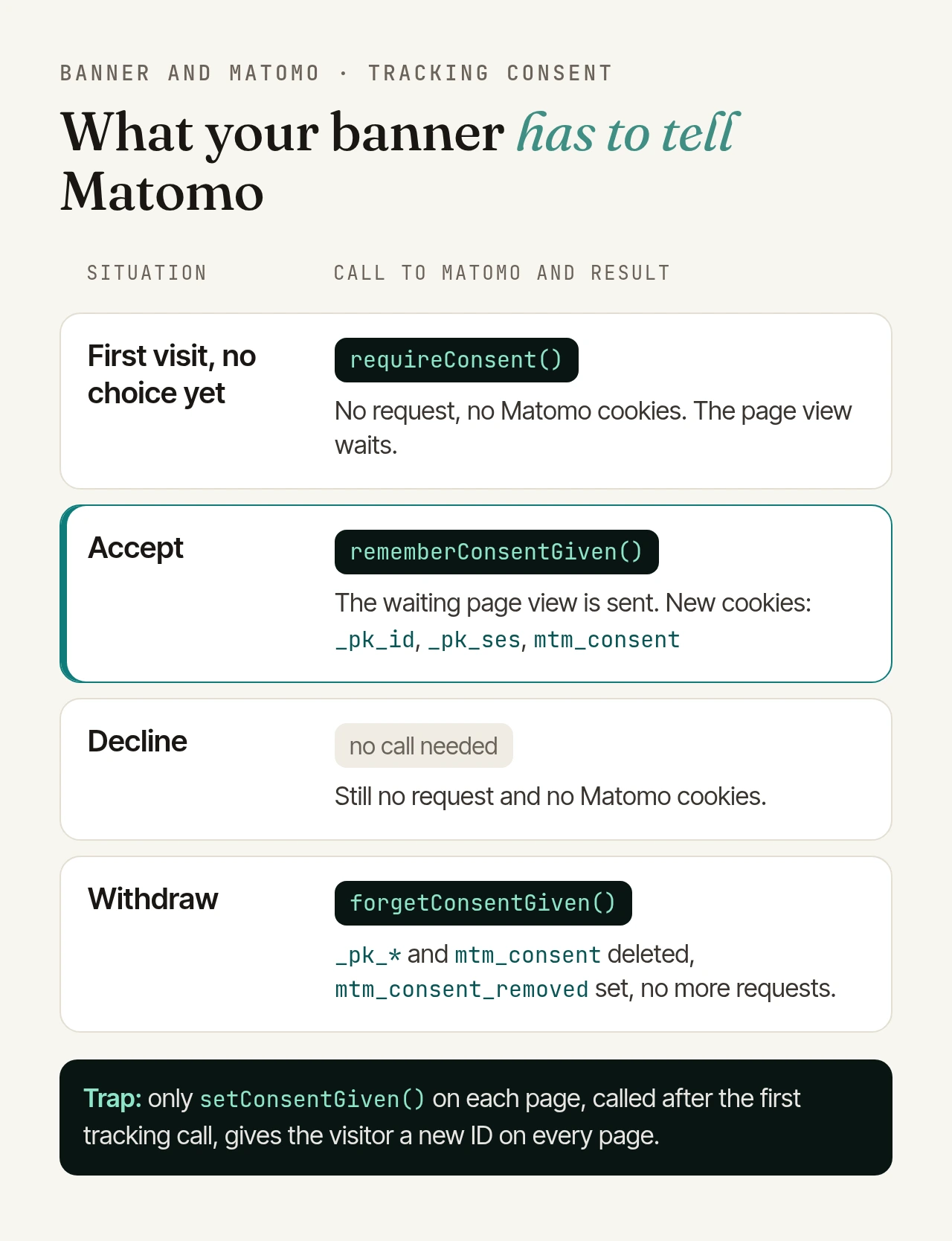
rememberConsentGivenonce when the visitor accepts. Matomo sets the cookiemtm_consentand tracks on all following pages by itself. Without an argument it lasts 30 years, so give it the same lifetime as your banner's consent, in hours:['rememberConsentGiven', 8760]means twelve months. - Your banner remembers it: then you call
setConsentGivenon every page where consent exists.
The second way has a trap, which we reproduced with the current Matomo tracker in a browser: as long as Matomo finds no remembered consent, it deletes its _pk_* cookies on the first tracking call of each page. If your banner reports consent only after that call, which easily happens with CMPs that load asynchronously, Matomo creates a new visitor ID on every page. Returning visitors are no longer recognised, even though they consented. This applies to both consent types. The fix is the first way, or calling setConsentGiven before Matomo loads.
In Safari, according to Matomo, a remembered consent only lasts seven days because of Intelligent Tracking Prevention. And if you track several subdomains in one website, widen the cookie domain to the shared domain (setCookieDomain with *.example.com, or the Cookie Domain field in Tag Manager) so the consent applies everywhere.
The calls from your banner#
Whether you use a CMP or your own banner, the decision has to reach Matomo as one of two calls. For your own banner that fires an event with the state of the statistics category (the event name is up to you), it looks like this:
window.addEventListener('my-consent', (event) => {
  const _paq = (window._paq = window._paq || []);
  if (event.detail.statistics) {
    _paq.push(['rememberConsentGiven', 8760]); // accept and remember
  } else {
    _paq.push(['forgetConsentGiven']); // decline or withdraw
  }
});
_paq.push works even before Matomo has loaded: the tracker works through the queue once it is ready. On decline, the call isn't strictly needed because Matomo keeps waiting anyway, but it does no harm and covers withdrawal too.
In Matomo Tag Manager#
In Tag Manager, the integration has three parts:
- Consent in the configuration: in the Matomo Configuration variable, select "Require tracking consent" or "Require cookie consent". Only one of the three consent options can be active; with none selected, Matomo sets cookies without consent.
- Consent script: a Custom HTML tag holds the calls above, wrapped in a
<script>element. Matomo's guides recommend the position "Head Start" and a DOM Ready or Window Loaded trigger. - Matomo tag: it stays on the Pageview trigger. It fires right away, but with tracking consent it only sends once consent is given.
What about triggers? For tags without their own consent logic, such as advertising tags, Matomo describes a different route: your banner writes the status to the data layer, for example _mtm.push({event: 'consent_update', statisticsConsent: true}). A Data-Layer variable reads statisticsConsent, and a Custom Event trigger listens for consent_update and fires only when the variable equals true. You can gate the Matomo tag the same way, but the configuration option is the better safety net: it holds requests back even if a trigger fires too early. If you still fire the Matomo tag through a trigger, make sure the event comes only once per page (Matomo lists duplicate tracking as a typical mistake), and keep calling forgetConsentGiven on withdrawal. A trigger that doesn't fire deletes no cookies.
Without Tag Manager: the JavaScript tracker#
In the standard tracking code, add one line before trackPageView:
var _paq = (window._paq = window._paq || []);
_paq.push(['requireConsent']);
_paq.push(['trackPageView']);
_paq.push(['enableLinkTracking']);
// then setTrackerUrl, setSiteId and loading matomo.js as usual
The calls from your banner stay the same as above.
Withdrawal: what has to happen#
forgetConsentGiven deletes mtm_consent and the Matomo cookies _pk_*, sets the cookie mtm_consent_removed and stops tracking at once. In our browser test, not a single request went out afterwards, including on the next page. If the visitor consents again later, rememberConsentGiven lifts the block. forgetCookieConsentGiven, by contrast, only deletes mtm_cookie_consent and the _pk_* cookies; Matomo then keeps tracking without cookies.
These calls only work where the tracker runs. If your banner reloads the page after a withdrawal before Matomo has processed forgetConsentGiven, mtm_consent stays, and Matomo keeps tracking on the next page. So keep your banner and Matomo's cookie in sync: if your banner has no consent stored, delete mtm_consent (or mtm_cookie_consent) and _pk_* before Matomo loads. And put a "Cookie settings" link in your footer that reopens the banner.
Opt-out when you track without consent#
Where you track without consent after a legal review, visitors need a way to object instead. Ready-made code is under Administration, Privacy, "Users opt-out". A custom switch uses optUserOut, which in the tracker is simply another name for forgetConsentGiven, so it sets mtm_consent_removed too. Matomo stresses that an opt-out is only enough where no consent is required. The details are in our article on cookieless Matomo.
Connecting a consent management platform#
Matomo maintains guides for many CMPs, usually for both the tracking code and Tag Manager: Cookiebot, Usercentrics, OneTrust, CookieYes, Osano, Klaro, Complianz, Didomi, Tarte au Citron, Axeptio, CookieScript, GetTerms and Silktide. Six of them (Cookiebot, CookieYes, Complianz, Klaro, Osano, Tarte au Citron) Matomo even detects on your website and then points you to the matching guide, for example under Administration, Privacy, "Asking for consent".
The pattern is always the same: a script waits for the tracker and the CMP, listens for the CMP's event, checks the statistics category and calls rememberConsentGiven or forgetConsentGiven. According to Matomo's guides, only the interfaces differ:
- Cookiebot: events
CookiebotOnAcceptandCookiebotOnDecline, checkingCookiebot.consent.statistics. - Usercentrics: event
UC_CONSENT, checking the Matomo service. Usercentrics recommends adding its script directly to the page source rather than through a tag manager. - OneTrust: event
OneTrustGroupsUpdated, checking whetherOnetrustActiveGroupscontains your statistics category. - Klaro: a watcher registered with
klaro.getManager().watch()that reports the state of thematomoservice. - Complianz (WordPress): in the wizard, choose "Yes, with Matomo". Complianz then adds Matomo itself, and you switch off tracking in the Matomo plugin for WordPress.
For Cookiebot, CookieYes, OneTrust and Axeptio, Tag Manager also ships its own tags that load the CMP script. Matomo's advice: use either that tag or the script in your page source, never both.
How to test the integration#
Use a private window without an ad blocker and open the developer tools: in the Network tab, filter for matomo.php (or your own tracking endpoint), and keep the cookie view under Application or Storage open.
- First visit: no request to
matomo.php, no_pk_*cookie, only your banner's own cookie. - Decline: the same picture, on the next page too.
- Accept: the request for the current page view goes out immediately, and
_pk_id,_pk_sesandmtm_consentappear. - Next page: the banner stays closed and the value of
_pk_idstays the same. If it changes on every page, you have hit the trap described above. - Withdraw: the
_pk_*cookies andmtm_consentdisappear,mtm_consent_removedappears, and no more requests follow.
In Tag Manager, Preview / Debug mode shows which tags and triggers fired; to share it, append ?mtmPreviewMode= plus your container ID to the URL. Matomo's Visits in Real-time report shows whether a visit arrived. From the outside, the free Matomo tracking checker shows whether Matomo counts on a page or waits for consent; it opens the page once in an isolated browser.
Conclusion#
Most Matomo consent problems are wiring mistakes, not legal questions: a missing option in the configuration, a banner that reports too late, a withdrawal that never reaches Matomo. With tracking consent, a remembered consent with a matching lifetime and a withdrawal kept in sync, the technical side is clean.
If you'd rather not run Matomo yourself: we operate your instance in German data centres, including updates, backups and monitoring. More on our Matomo hosting page.