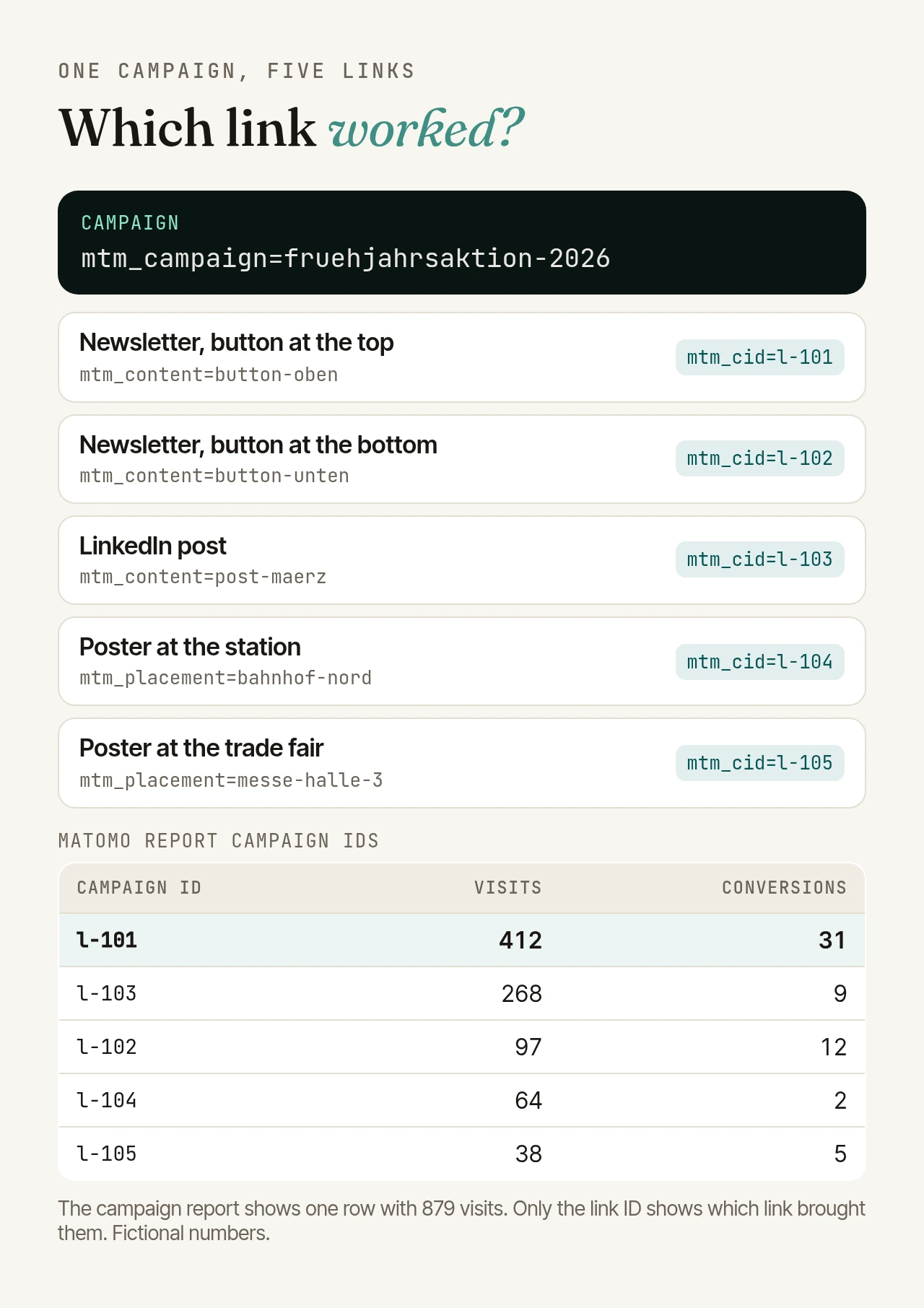
A campaign rarely consists of a single link. The newsletter has one button at the top and one at the bottom, plus there's a LinkedIn post and two posters with a QR code. Yet Matomo's campaign report ends up with a single row: the spring promotion with its visits and conversions. Which link brought them, it doesn't show. This guide explains how to analyse Matomo campaigns per link: with which parameters, in which reports, and where it gets laborious.
What "per link" means in Matomo#
Matomo itself stores only the name and the keyword of a campaign. Everything else is handled by Matomo's free Marketing Campaigns Reporting plugin. Only with it does Matomo know the fields that tell single links apart:
| Field in Matomo | MTM | UTM | What for |
|---|---|---|---|
| Campaign content | mtm_content |
utm_content |
the variant: top or bottom button, image A or B |
| Campaign placement | mtm_placement |
not available | the place: station, fair hall, sidebar |
| Campaign group | mtm_group |
not available | the ad group or audience |
| Campaign ID | mtm_cid |
utm_id |
a unique code per link |
Content and placement are easy to read, but not unique by themselves: two newsletters with the same button-oben button end up in the same row. A link only becomes unique with its own campaign ID. Matomo stores it with up to 100 characters. Our recommendation: give every link an ID and also a readable content or placement value. The ID makes the row unique, the content says what is behind it.
How to set up the other parameters is covered in our guide Campaign tracking in Matomo. The free utm to mtm converter rewrites existing links with utm_ parameters. But each link uses only one style.
The reports for it#
With Marketing Campaigns Reporting, Matomo shows its own report for each field under Acquisition › Campaigns. For results per link, these matter:
- Campaign IDs: one row per link.
- Campaign Contents and Campaign Placements: one row per variant or place, across all campaigns.
- Campaign Names with a subtable: clicking a campaign opens "Keyword - Content", the variants of exactly that campaign.
The reports Campaign IDs, Campaign Contents, Campaign Placements and Campaign Names can switch to the goals view. The table then shows conversions, conversion rate and revenue of each goal per link. You find the same dimensions under Goals, at the bottom of the page.
Two more tools help to look at single links:
- Segments: the segment editor lists every field under "Campaigns", for example campaign ID equals
l-101. Every report then shows only the visits through that link, from entry pages to devices. Segments filter whole visits, not single actions. - Visits Log: every visit shows the campaign values it came with. It is the quickest way to test a new link: open it once and check the values.
Where visitors of a link go next, our Visit Journey plugin shows with a pre-processed segment for the campaign ID. How that works is in our guide Path analysis in Matomo. And if you want to send the numbers regularly: Matomo can email the campaign reports as scheduled reports.
Where results per link get laborious#
The reports are there. The upkeep is what takes work:
- The ID says nothing.
l-104is unique, but without a list nobody knows it is the poster at the station. Somewhere you need to note which ID belongs to which link. In many teams that is a spreadsheet nobody maintains after the third campaign. - Values drift apart. If someone builds a link from memory,
button_obensits next tobutton-oben, and the numbers split across two rows. How many such variants your Matomo already holds, the free Campaign Score plugin shows. - Conversions follow attribution. Matomo credits a conversion to the referrer the visitor last came through, even if that was days ago. That is why a link sometimes shows conversions but no visits in the selected period. More in the attribution section of our guide.
- Several websites, separate reports. If a campaign runs on several websites, Matomo keeps its numbers per website.
- Agencies need access. For an agency to see its numbers itself, it needs a Matomo login with the right permissions, or someone sends it exports regularly.
- Costs are missing. Matomo doesn't know what a link cost. You calculate the cost per conversion next to it.
In all of this, a broken link only shows up when its row stays empty. Whether Matomo counts on the landing page at all, the free Matomo tracking checker checks beforehand.
Results per link with Feinwerk Campaigns#
Feinwerk Campaigns, our UTM builder with a naming convention, takes this upkeep off your hands:
- The code comes with the link. Every link automatically gets its own code, as
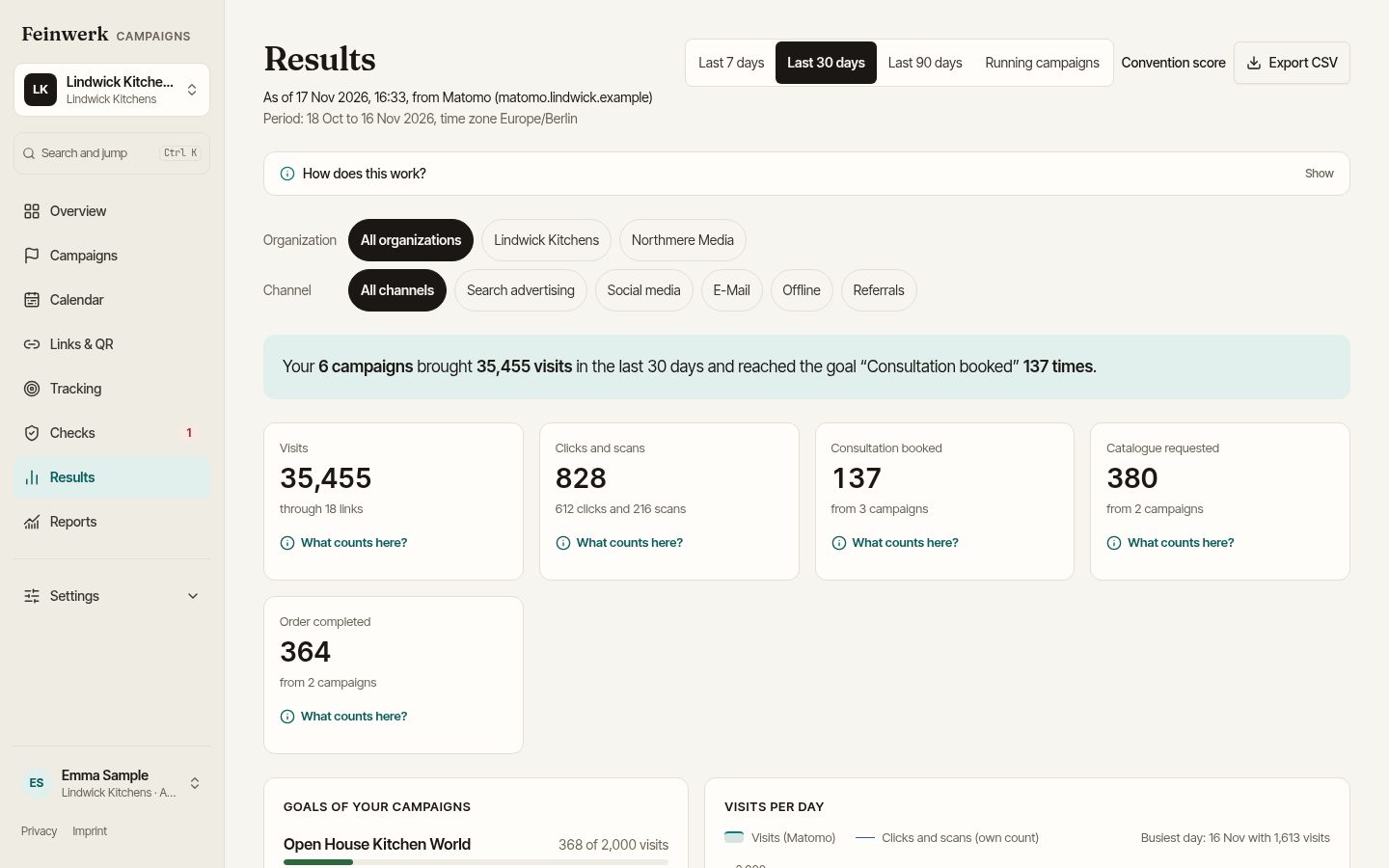
mtm_cidor asutm_id. The platform knows which code belongs to which link, campaign and placement. No more spreadsheet. - The numbers come from Matomo. With the Matomo connection, the platform fetches visits and conversions per link and placement every night, for each Matomo goal separately. At the push of a button, it reloads the last seven days. For this it needs the Marketing Campaigns Reporting plugin in Matomo and the token of a user of your own with view access. It reads only aggregated daily values and changes nothing in Matomo.
- Everybody sees the same numbers. Teams and agencies find their results where they build the links, instead of asking others for them. Every number comes with an explanation of what is counted, and a weekly summary arrives by email every Monday.
- Target against actual. For every campaign you can set targets and compare them with the numbers from Matomo.
How to set up the connection is in the docs under connect Matomo. All features and prices are in our article Feinwerk Campaigns.
Frequently asked questions#
Campaign ID or content: which do I need?#
Both have their place. The content (mtm_content) describes the variant and is readable in the report. The campaign ID (mtm_cid or utm_id) makes every link unique, even if two links share the same content. If you want results per link, give every link an ID.
Do old numbers change if I rename a link?#
No. Matomo stores the campaign values a visit came with. If you change a link later, only new visits count under the new values. So name values cleanly before launch, not afterwards.
Does it work without Marketing Campaigns Reporting?#
Only roughly. Without the plugin, Matomo knows only name and keyword per campaign. Some teams therefore put the variant into the keyword. That works, but it mixes two things in one field. The plugin is free and can be installed from Matomo's Marketplace.