Whether Matomo is the better choice for you is covered in GA4 now has dashboards: is Matomo still the better choice?. This article answers the next question: how do you migrate from Google Analytics 4 to Matomo without losing history, conversions or campaign data?
Most migrations go wrong before the tracking code goes in: during the history import, or because nobody checked what GA4 is connected to. So this plan runs from the audit to deleting the GA4 property.
Audit: what does GA4 measure today?#
List what GA4 does today and who relies on it, one row per item with a column for the Matomo counterpart:
- Events: your own, such as
generate_lead, and the enhanced measurement ones: page views, scrolls, outbound clicks, site search, video engagement, file downloads and form interactions. - Key events: what GA4 now calls the events that used to be conversions. In Matomo they become goals.
- Custom dimensions and the event parameters that fill them.
- Ecommerce: product views, cart, purchases.
- Audiences: are they only analysed, or does Google Ads use them for remarketing?
- Explorations: which funnel and path explorations does your team use? In Matomo, our Visit Journey plugin shows the conversion paths to every goal as a dynamic funnel, without presetting the steps and with channels, events and goals in the path, plus the paths from the entry page. See our guide to path analysis in Matomo. For free-form explorations with a secondary dimension, use our free Data Exploration plugin, see GA4 Explorations in Matomo.
- Integrations, the item people forget: a linked Google Ads account turns key events into conversions for bidding, and the Search Console link adds reports on search queries and landing pages.
Self-hosted or managed?#
Matomo runs on your own servers, in Matomo Cloud, or with a provider who operates the instance for you. On your own server, the import alone has requirements: PHP must be allowed to run exec() or shell_exec() and to start the PHP command line from a web request, nohup must be installed, and archiving should run from cron. Then come updates, backups and monitoring, permanently.
If your team doesn't want to own that, hand it over, for example to our managed Matomo hosting in German data centres, under a data processing agreement according to Art. 28 GDPR.
Keep your history: the Google Analytics Importer#
The Google Analytics Importer is a free plugin by Matomo that imports GA4 reports into Matomo, with versions for Matomo 5 and 6. It can no longer save Universal Analytics data: Google shut down UA properties in July 2024 and deleted data that hadn't been exported.
Setup in brief:
- In the Google Cloud Console, create a project and enable the Google Analytics Data API and, for GA4, the Google Analytics Admin API.
- Create an OAuth client of type "Web application" with your Matomo URL plus
/index.php?module=GoogleAnalyticsImporter&action=processAuthCodeas the authorised redirect URI. Publish the app: an external app left in testing mode loses its authorisation after seven days. - In Matomo, go to Administration › System › Google Analytics Import, upload the JSON file, authorise, and schedule the import. Or use the command line:
php ./console googleanalyticsimporter:import-ga4-reports --property="properties/123456789" --dates=2023-01-01,2026-11-24
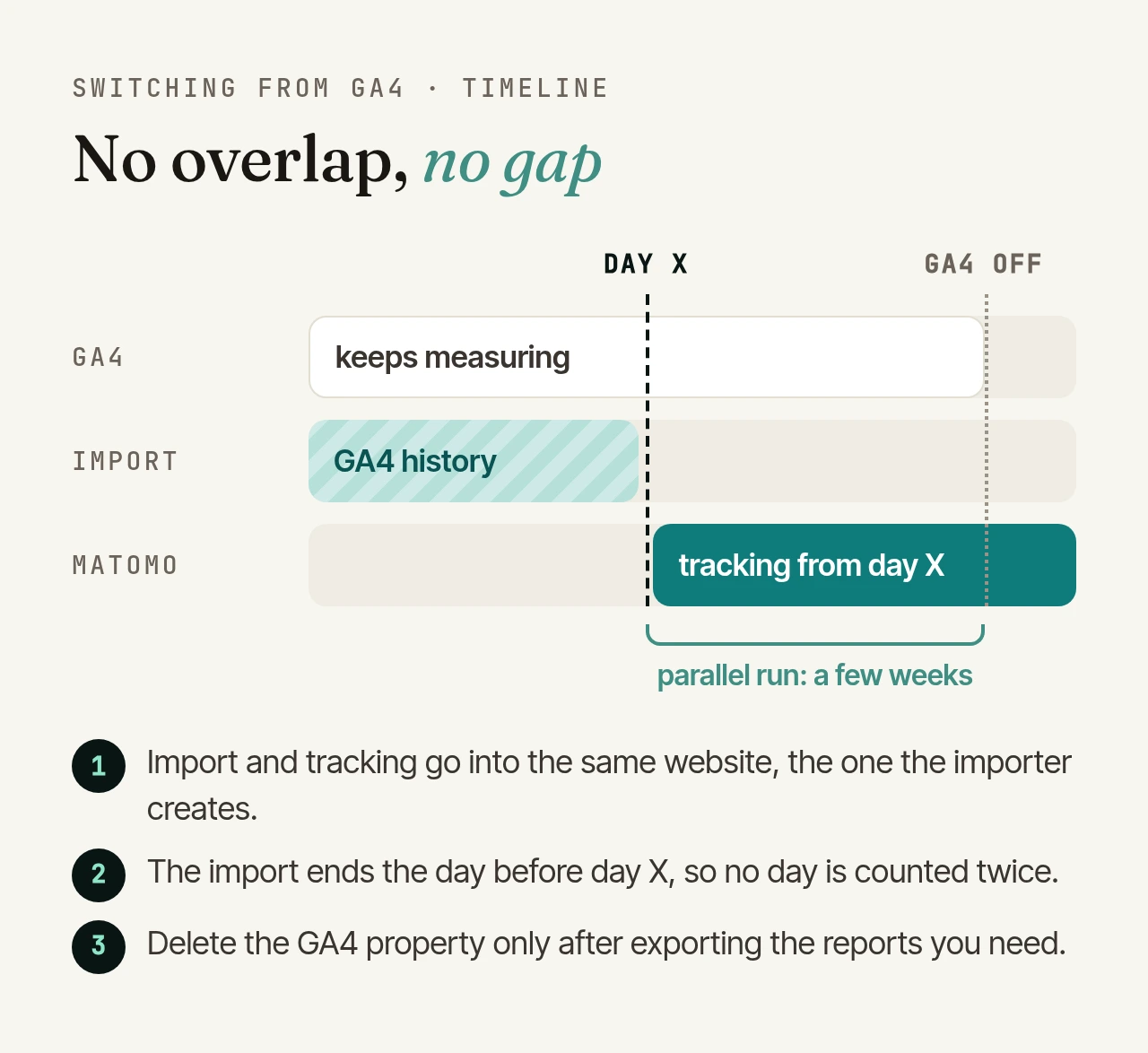
The key planning point: the importer always creates a new website in Matomo. It can't import into an existing one, and the two can't be merged later. So start the import first and install the tracking code of the website it created. The import ends the day before tracking starts, with no overlapping day; you can set the end date on the import job later.
Google limits API requests per day, so a full import can take several days.
What the import doesn't do: it brings in aggregated reports, not raw data. The Visits Log, segments and reports that plugins build from raw data don't work for imported periods, and unique visitors are missing for weeks and months. Imported GA4 goals come without metrics such as revenue and conversion rate, funnels are not imported, and item-scoped custom dimensions are ignored.
After the import, review the new website. According to its source code, the importer uses the property name as the website URL, switches site search off and creates no Tag Manager container. Fix all three. Then remove the Google authorisation and back up the database: once the GA4 property is deleted, nothing can be re-imported.
Map events and key events#
Matomo events have a fixed structure (category, action, optional name and value), GA4 events a name plus any parameters. So you decide which value goes where:
// GA4
gtag('event', 'generate_lead', { form_id: 'contact' });

// Matomo: category, action, name
_paq.push(['trackEvent', 'Form', 'contact', 'generate_lead']);
Tip: keep the GA4 event name as the Matomo event name. The importer creates a goal for each key event matching exactly that name, so imported goals keep counting after the switch.
The rest maps like this:
| GA4 | Matomo |
|---|---|
page_view |
page view, part of the default tracking code |
outbound click, file_download |
automatic via enableLinkTracking in the default code |
view_search_results |
site search via URL parameters such as q, query, s or search |
scroll |
event fired by the Tag Manager trigger "Scroll Reach" |
| key event | goal triggered by an event, URL, page title, download, outlink, time on site or manually |
| custom dimension | custom dimension, by default five each for visits and actions |
| audience | segment |
Three differences matter. A Matomo goal counts once per visit by default; tick "Allow Goal to be converted more than once per visit" if you need more. Segments filter reports, they don't become remarketing lists in Google Ads. And custom dimensions can't be deleted in Matomo, so create them deliberately.
Ecommerce#
Ecommerce is enabled per website in Matomo; the imported website already has it on. GA4's ecommerce events have direct counterparts: view_item becomes setEcommerceView followed by trackPageView, add_to_cart becomes addEcommerceItem plus trackEcommerceCartUpdate, and purchase becomes trackEcommerceOrder. On the order confirmation page:
_paq.push(['addEcommerceItem', 'SKU-17', 'Trail shoe Summit', 'Shoes', 79.90, 1]);
// order ID, grand total, subtotal, tax, shipping
_paq.push(['trackEcommerceOrder', 'A-1042', 89.90, 79.90, 14.35, 10.00]);
Add the items first with addEcommerceItem; Matomo attaches them to the order. The order ID must be unique so nothing counts twice. If your shop already pushes this data into the GTM data layer, a Matomo guide shows how to read it from ecommerce.items.
Move your tags to Matomo Tag Manager#
There is currently no automatic import of Google Tag Manager containers. You rebuild variables, triggers and tags in Matomo Tag Manager, using Custom HTML tags where no template exists, then check everything in preview and debug mode and publish a version.
Since Matomo 5.2, one feature saves a lot of work: Matomo Tag Manager can actively pick up events from the Google Tag Manager data layer. The setting "Actively synchronise from the Google Tag Manager data layer" is on for new containers; for existing ones you enable it when editing the container. A "Custom Event" trigger then fires on events your site already pushes to the data layer, and "Data Layer" variables read their values. So nothing is implemented twice during the parallel run.
Run both in parallel#
Run GA4 and Matomo side by side for a few weeks and compare visits, page views, goals and revenue. According to Matomo, visits and page views typically differ by no more than 5 to 10 percent when both tools are configured correctly. Bigger gaps usually come from configuration, consent, bot exclusion or traffic source attribution. Check single goals and campaigns in the Visits Log. Whether Matomo counts on your key pages at all, with the right site ID and despite the consent banner, the free Matomo tracking checker shows beforehand.
Rewire consent#
Your consent banner probably drives GA4 via Google's consent mode. Matomo gets the visitor's choice through its own functions: requireConsent and setConsentGiven if nothing should be tracked without consent, or requireCookieConsent and rememberCookieConsentGiven if Matomo tracks without cookies until consent is given. Matomo publishes guides for several consent tools and for Tag Manager. Our articles on Matomo consent banner integration and cookieless Matomo go into detail.
Your privacy policy changes too; the settings are a decision for you and your privacy counsel. This section is a technical overview, not legal advice.
Search Console, Google Ads and campaigns without GA4#
Search Console: the GA4 link goes away, and Search Console itself only keeps 16 months of data. Our Search Report brings Google Search Console and Bing Webmaster Tools into Matomo as reports, loads the last 16 months from Google when you connect it, and keeps everything from then on. The sooner you connect it, the more history you keep.
Google Ads: if Google Ads imports your conversions from GA4 key events today, they stop arriving once GA4 stops measuring. Plan the replacement before you switch off. Google Ads can measure conversions with its own Google tag. Or you send them from Matomo: Conversions API sends Matomo goals and ecommerce orders to Google Ads server-side, matches clicks via gclid, gbraid and wbraid, and in its default mode only sends with consent. If a pixel is still running alongside, the platforms deduplicate via a shared event ID. More in our Matomo Google Ads use case in the store for Plugins for Matomo.
Campaigns: your utm_ links keep working. Matomo itself, however, only stores the campaign name and keyword; source and medium need the free Marketing Campaigns Reporting plugin. Matomo doesn't read the gclid, so ads need campaign parameters in the final URL suffix. The free campaign link checker shows how GA4 and Matomo read any of your existing links. Our Matomo campaign tracking guide covers the details. If you are used to GA4's default channel groups, Channel Grouping creates a grouping modelled on them in one click. It also puts ad clicks with a gclid into Paid Search, even without parameters. If campaigns already land in "Unassigned" in GA4, it is usually down to UTM values GA4 assigns to no channel; the guide GA4 Unassigned traffic shows how to fix them before you take the values over to Matomo. If several teams or agencies work on your campaigns, the switch is a good moment for one shared UTM naming convention: the UTM builder Feinwerk Campaigns builds the links by it, checks every landing page before launch and, with Matomo, shows visits and conversions per link.
Switch off GA4 and archive the old data#
Once the numbers are plausible and every integration is replaced, remove the GA4 tags and update your privacy policy. Before deleting the property, save what the import doesn't cover:
- Export reports: GA4 exports reports as PDF, CSV or to Google Sheets; CSV files and Sheets hold up to 100,000 rows.
- BigQuery: if you use the export, check that the tables are complete. Data that has been exported once can't be exported again.
- Back up the Matomo database: the imported reports are now your long-term history.
A deleted property stays in the trash for 35 days before Google deletes it permanently.
Checklist#
- Events, key events, dimensions, audiences and integrations listed.
- Hosting decided: own server, cloud or managed.
- Import started first; website URL and site search fixed.
- Events, goals and ecommerce in place, GA4 event names kept.
- Tag Manager container created, data layer sync checked.
- Tracking starts the day after the import ends; a few weeks in parallel.
- Consent banner covers Matomo, privacy policy updated.
- Search Console connected, Google Ads conversions replaced, campaign links checked.
- GA4 tags removed, reports exported, database backed up, then the property deleted.
We can also plan and carry out the switch with you, see GA4 migration. If you'd rather not run Matomo yourself: we operate your instance in German data centres, with updates, backups and 24/7 monitoring. Get in touch, the initial consultation is free.